
What is self assessment tax?

The question,“What is self-assessment tax” has been answered in detail in this blog. It is extremely important to understand what is self-assessment tax or SAT, because first of all, taxes are an unavoidable entity. You have to pay taxes no matter what. Every individual is required to be updated with financial knowledge, especially related to taxes to attain financial stability and minimize tax liabilities. It must be noted that taxpayers who need to fill out their Income Tax Return or ITR have to pay this tax before filing the return.
To understand what is self-assessment tax, one must be aware that there are three ways in which the government collects taxes from you:
-
- Self Assessment Tax
What is self-assessment tax?
Meaning: Self Assessment Tax (SAT) is the amount that a taxpayer has to pay on their income after deducting TDS(Tax Deducted at Source) and Advance Tax in that particular financial year. In simpler words, when you pay taxes, the TDS and Advance Tax you paid during the financial year, gets deducted from the final payable tax. If the paid amount is not enough, the remaining balance will be required to be paid by you to cover the difference. This difference is called the Self Assessment Tax (SAT). Self Assessment Tax needs to be paid when the TDS and/or Advance Tax is lower than your tax liability. In such cases, the Self Assessment Tax covers the difference.
But why does such a difference arise? There could be several reasons behind this. Some of them are listed below:
-
- The amount that you may have deducted in the form of TDS was not accurate
-
- In case you forgot to consider any of your income while paying the advance tax
-
- If income earned from investments is high which the employer does not account for, such a situation of difference may arise.
Who is required to pay Self Assessment Tax?
Generally speaking, Self Assessment Tax is payable by a taxpayer who is related to income from other sources as well.
How to Calculate Self-Assessment Tax
Now that we have answers to the question, “What is self-assessment tax”, let's move forward and see how to calculate self-assessment tax.
Given below are the steps to calculate self-assessment tax
-
- The first step would be to enumerate your income from all the sources. This will include your salary as well as the other capital gains obtained.
-
- Secondly, you would be required to take into account tax exemptions and deductions as offered by Section 80C of the Income Tax Act, Section 80D of the Income Tax Act, and so on (these apply only if you file under the old tax regime).
-
- Following the Income slab you fall under, calculate the total payable tax on your income.
Using the formula given below, calculate the Self Assessment Tax (SAT).
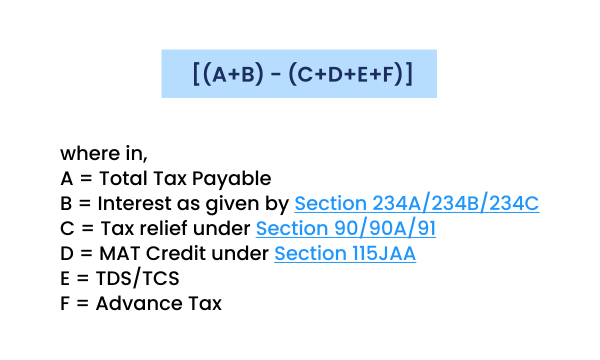
It must be noted that the SAT can be calculated using an online calculator as well. This will help provide accurate results in no time.
How to pay Self Assessment Tax Online?
Paying for the SAT online is a hassle-free job. Follow the steps below to pay SAT online.
-
- On any web browser, open the income tax e-filing portal
-
- Login by entering your login credentials
-
- Locate the e-File tab on the screen and tap 'e-pay Tax
-
- Tap on New Payment
-
- Choose the Income Tax option
-
- Tap on Proceed
-
- Select the Assessment year and self-assessment tax (300)
-
- Tap on Continue
-
- Type the tax amounts
-
- Tap on Continue
-
- Pay through your desired method
-
- Tap on Download to download the Challan after the payment is completed
How to pay Self Assessment Tax Offline?
Follow the steps below to pay your SAT offline.
-
- On your web browser, open the Income tax official website and go to e-Pay Tax.
-
- Choose Self-Assessment Tax (300) for the right assessment year and enter the tax amounts
-
- Select 'Pay at Bank Counter' and the authorised bank where you will pay, and generate the challan (CRN)
-
- Take a printout of the challan
-
- Go to a branch of that bank within 15 days, the validity of the challan. Manually filled challans are no longer accepted
-
- Make payment through cash (up to ₹10,000 per challan), cheque or demand draft
-
- Collect the receipt of the challan after the payment is completed
What will happen if you fail to pay Self Assessment Tax?
If you fail to pay the Self Assessment Tax, there obviously will be consequences. Listed below are the consequences that might take place in the case of non-payment of Self Assessment Tax.
There might be penal consequences like-
-
- The Income Tax Return or the ITR you filed will be considered defective, as you are supposed to pay the self-assessment tax beforehand to file the ITR.
-
- You might be imposed with late fees and penalties
-
- You will be liable to higher interests
What is the Due Date to pay the assessment tax?
As such, there is no particular due date to pay the Self-Assessment Tax. However, you are required to pay it before filing your return, otherwise you may receive a notice of intimation from the Income tax department. Along with that, you might be imposed with consequences such as penalties and late fees.
The article aimed at providing you with all the information regarding the Self Assessment Tax, including its meaning, who has to pay it, how to calculate the Self Assessment Tax, how to pay online, how to pay offline, and the consequences that you may need to face in case of non-payment of SAT. For more financial awareness, visit PensionBox.
Frequently asked questions
What is Self Assessment Tax?
Self Assessment Tax (SAT) is the amount that a taxpayer has to pay on their income after deducting TDS(Tax Deducted at Source) and Advance Tax in that particular financial year.
Can I pay the SAT online?
Yes, you can pay SAT online by visiting the Income Tax e-filing portal.
2,00,000+ Stories
Hope they inspires you as well.

their NPS stories for a golden retirement.







PensionBox simplifies the National Pension System(NPS), the government's pension scheme for private employees both for retail users and HRs/companies.
If you don’t have an NPS account, you can simply open your pension account within 2 minutes and if you have NPS PRAN already, you will be able track, invest and manage everything free of charge with best user experience.
We never touch or hold your money directly, your investments go safely to your chosen pension fund through approved channels.
We are built with Zerodha as POP , ensuring transparency, data security, and peace of mind. Your retirement savings are protected by regulation and secured by technology.
That’s why, PensionBox brings transparency, zero charges, timely support and freedom to select any pension fund so that you get the best experience investing in NPS & be better future ready.
That’s not it, we help you & your company together to maximise contribution and tax savings with minimal charges & best user experience.
If you are an existing zerodha user then you get a fast login or sign up using kite ID.
Once you are onboarded with kite ID, you get free access to
- Open NPS in 2 minutes
- Track existing NPS
- POP shift or CRA shifting
- Invest in one time or create SIP in NPS
- Withdraw NPS requests & instant withdraw tier 2
- Create your dream retirement plan
- Open NPS Vatsalya for your kid
- Share with HR (To unlock more tax benefits)
- Employer Contribution:
- Contributions made by your employer to your NPS account are tax-free up to 14% of your basic salary under Section 80CCD(2). Do connect us with your HR to enable this for you.
Tax Benefits in Old Tax Regime - Self-Contribution:
- Deduction up to ₹1.5 lakh under Section 80C.
- Additional deduction of ₹50,000 under Section 80CCD(1B) — exclusive to NPS investments!
- This allows you to claim a total deduction of up to ₹2 lakh every year on your NPS contributions.
- Employer Contribution:
- Contributions made by your employer to your NPS account are tax-free up to 10% of your basic salary (Basic + DA) under Section 80CCD(2). Do connect us with your HR to enable this for you.
- This is over and above your personal deduction limits, giving you extra tax efficiency.
Feel free to book a free call to learn more about NPS, NPS Vatsalya, Corporate NPS & PensionBox or contact the support team.