
PensionBox BlogsA Step-by-Step Guide to Managing Your KFINTECH NPS Scheme Allocation Changes

A Step-by-Step Guide to Managing Your KFINTECH NPS Scheme Allocation Changes

05 Oct 2026 • 4 min read
Written By
Aarushi Srivastava
Aarushi Srivastava
PensionBox

Managing your National Pension System (NPS) account doesn’t have to be complicated. Whether you are accessing your dashboard for the first time or want to rebalance your investment portfolio, the KFINTECH CRA portal gives you complete control over your retirement funds.

This step-by-step guide walks you through logging into your account and updating your NPS scheme allocations smoothly.

Part 1: How to Log In to Your KFINTECH Portal

Before updating your investment preferences, you must sign in securely. Follow these steps to access your KFINTECH NPS account:

Step 1: Access the KFINTECH CRA Portal

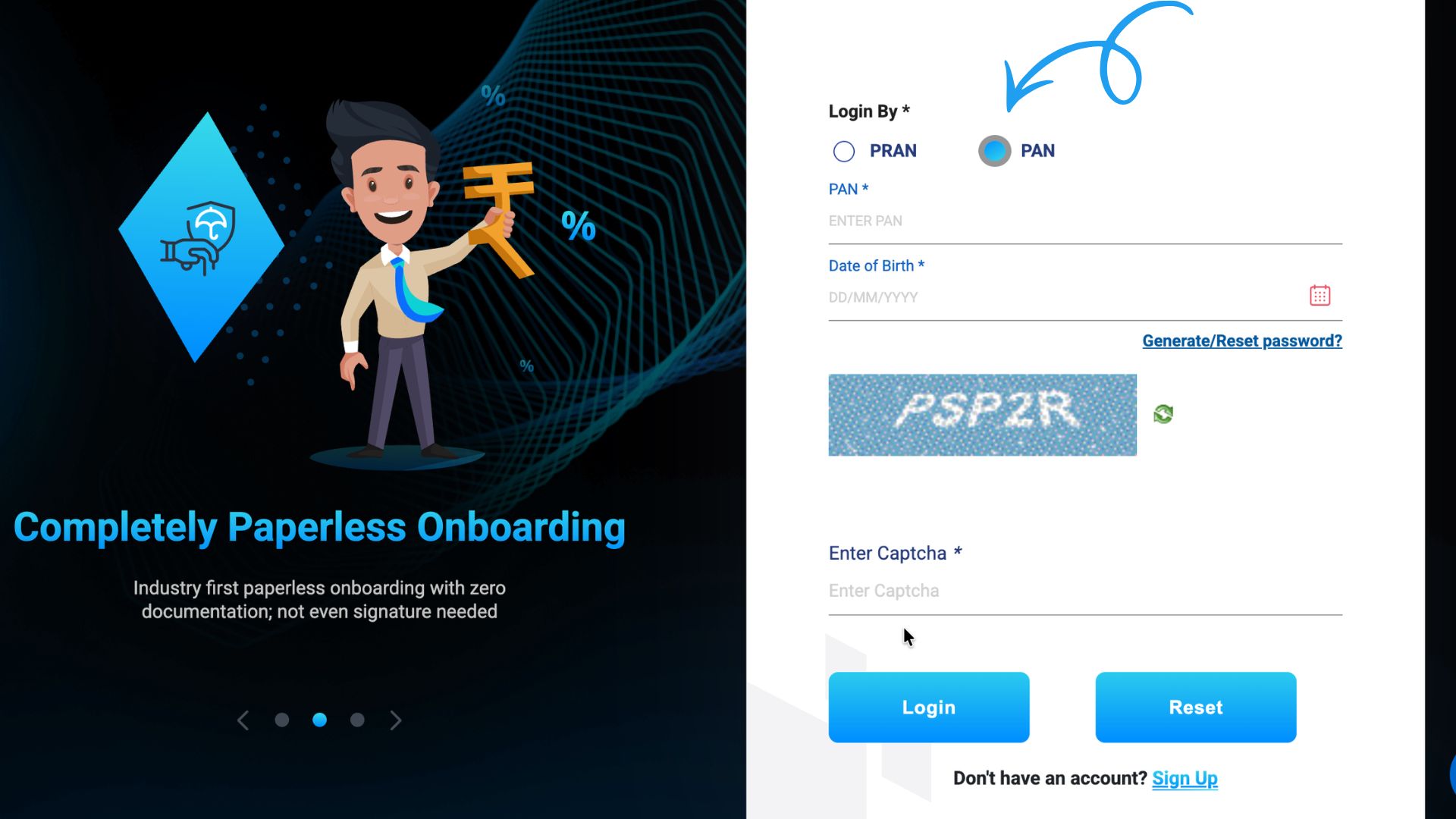
Visit the official KFINTECH CRA website to begin. Navigate directly to the login page from here to start the process 👇🏻.

KFintech login

Step 2: Initialize Password Setup (New Users)

If you are logging in for the first time or need to generate new credentials, click the Generate/Reset Password link on the login screen.
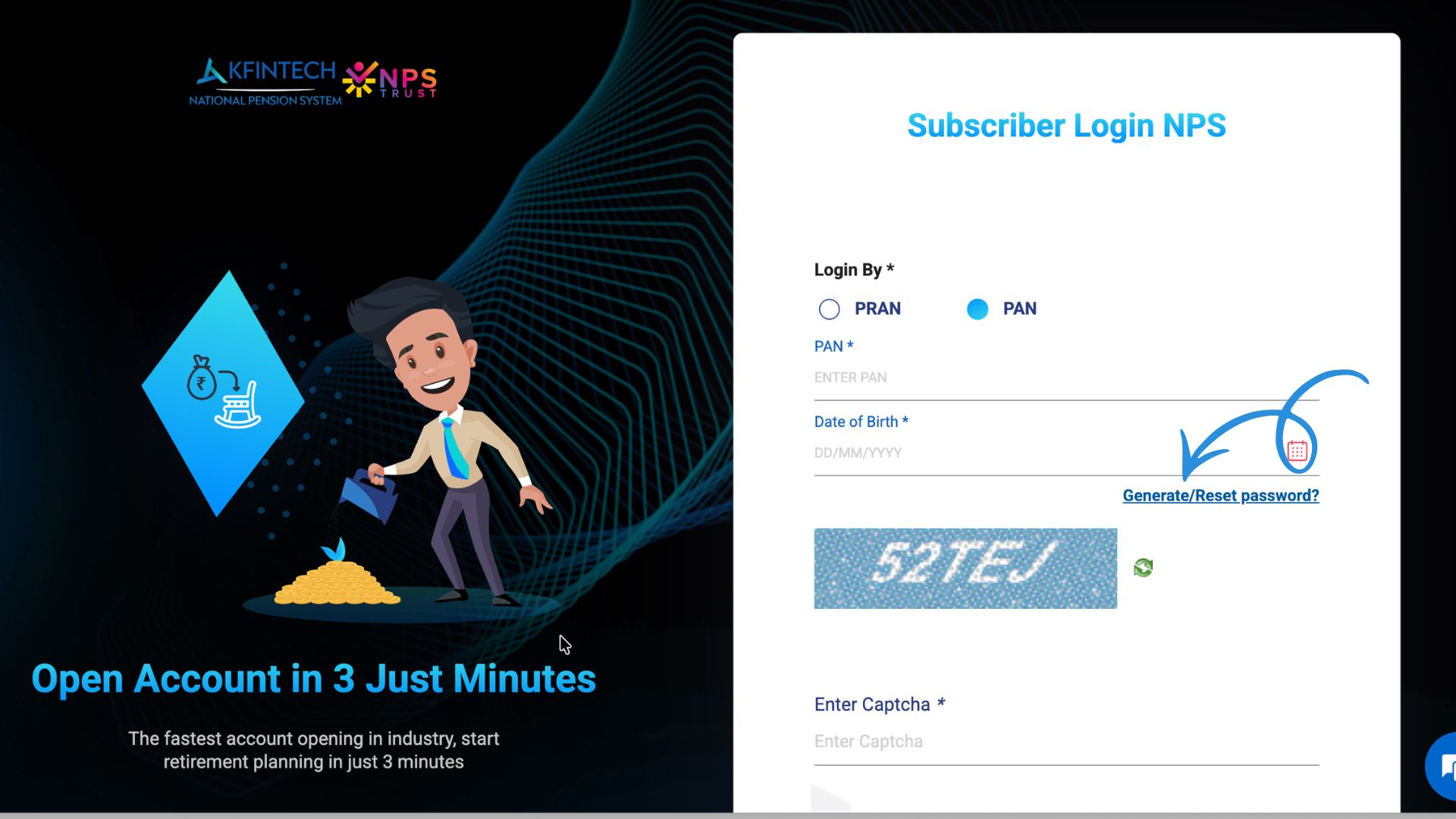
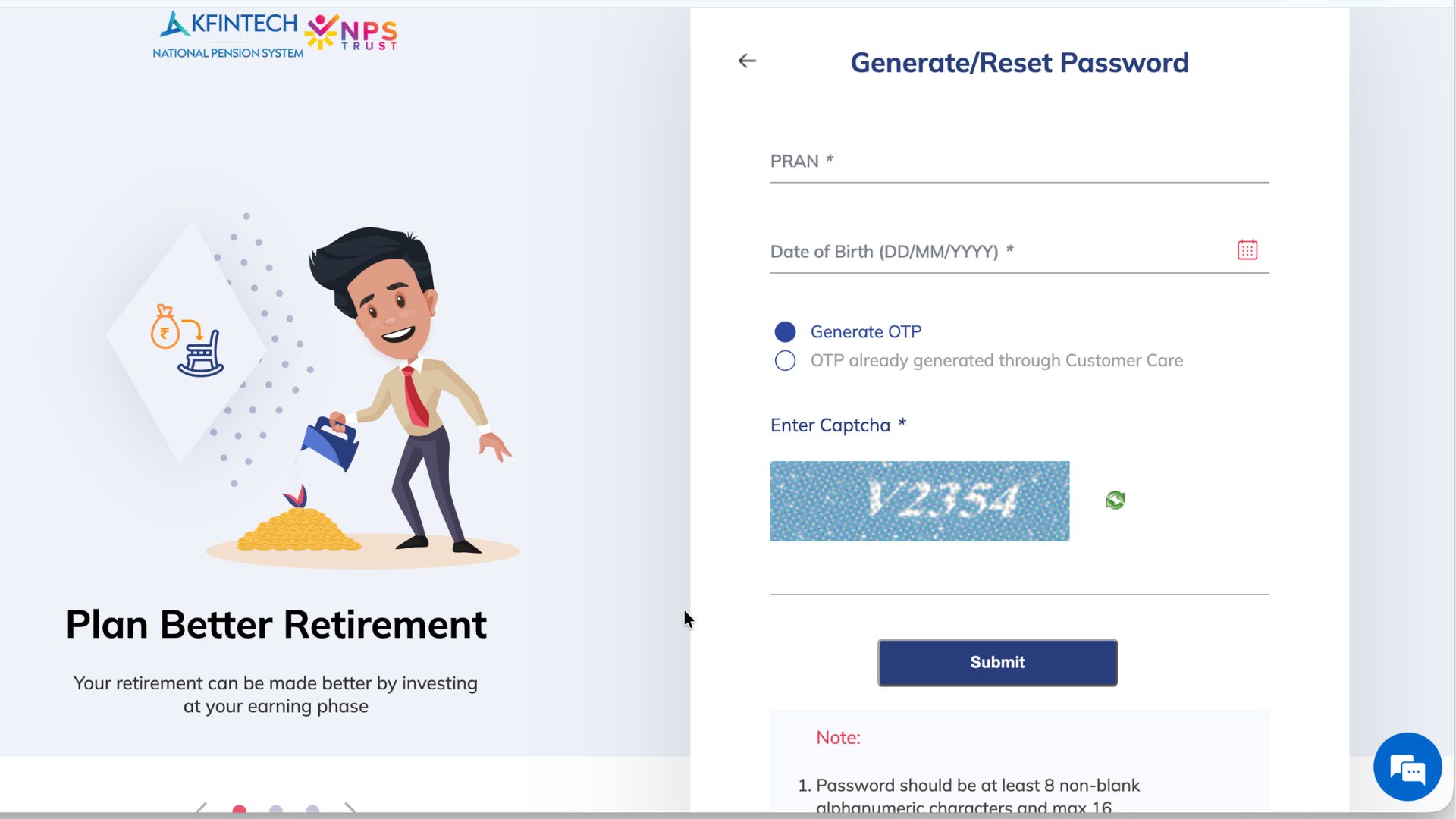
Step 3: Provide Your Authentication Details

On the verification page, enter your Permanent Retirement Account Number (PRAN) and registered Date of Birth into the designated fields. Ensure these details match your records exactly.
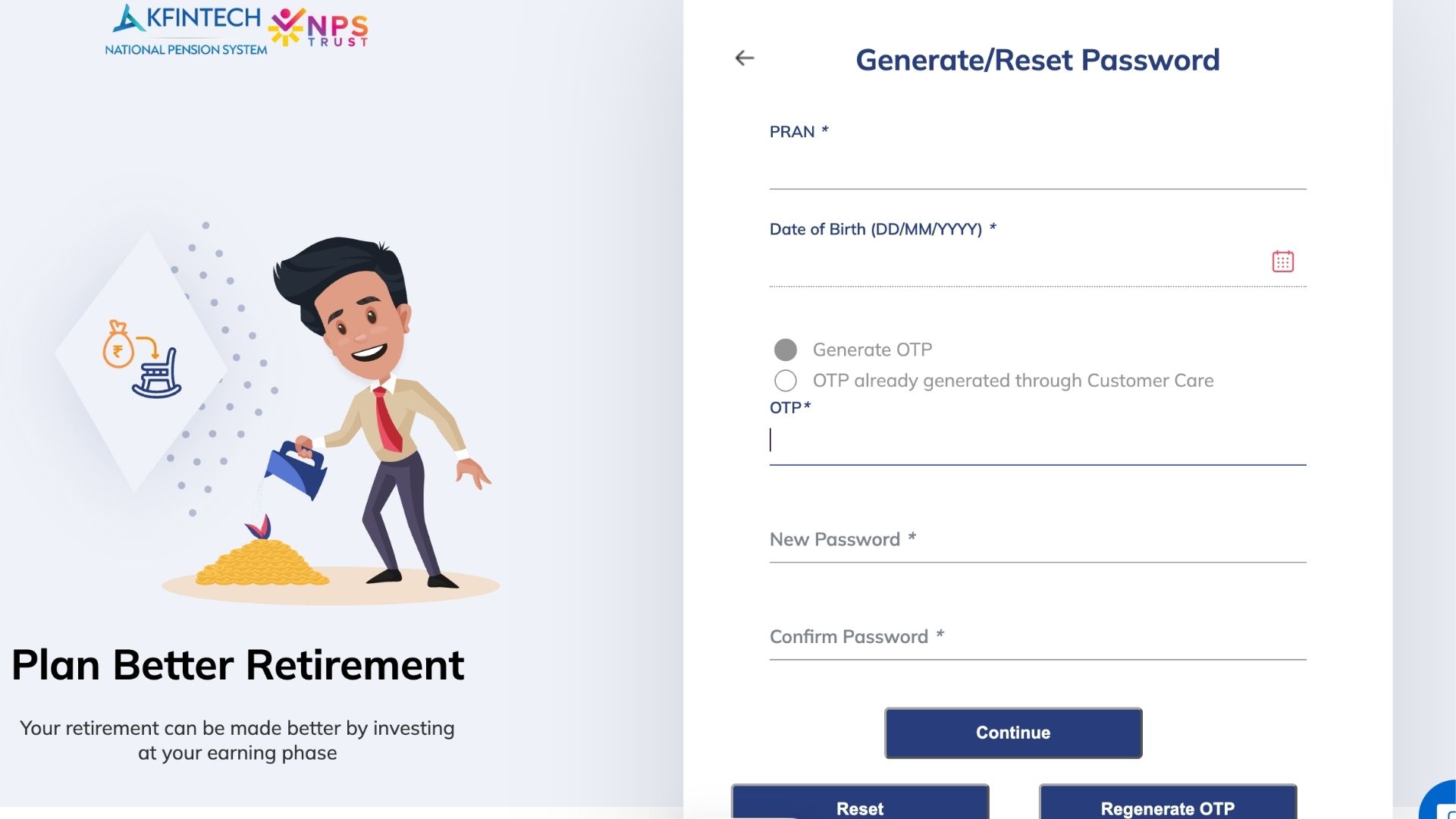
Step 4: Establish a Secure Password

After your details are verified, create a new password. Enter your preferred password, confirm it in the next field, and click Reset to save your credentials.
Step 5: Sign In to Your NPS Dashboard

Return to the main login page and access your account using one of two methods:

1. Log in using PRAN: Enter your PRAN and new password, then click Login.
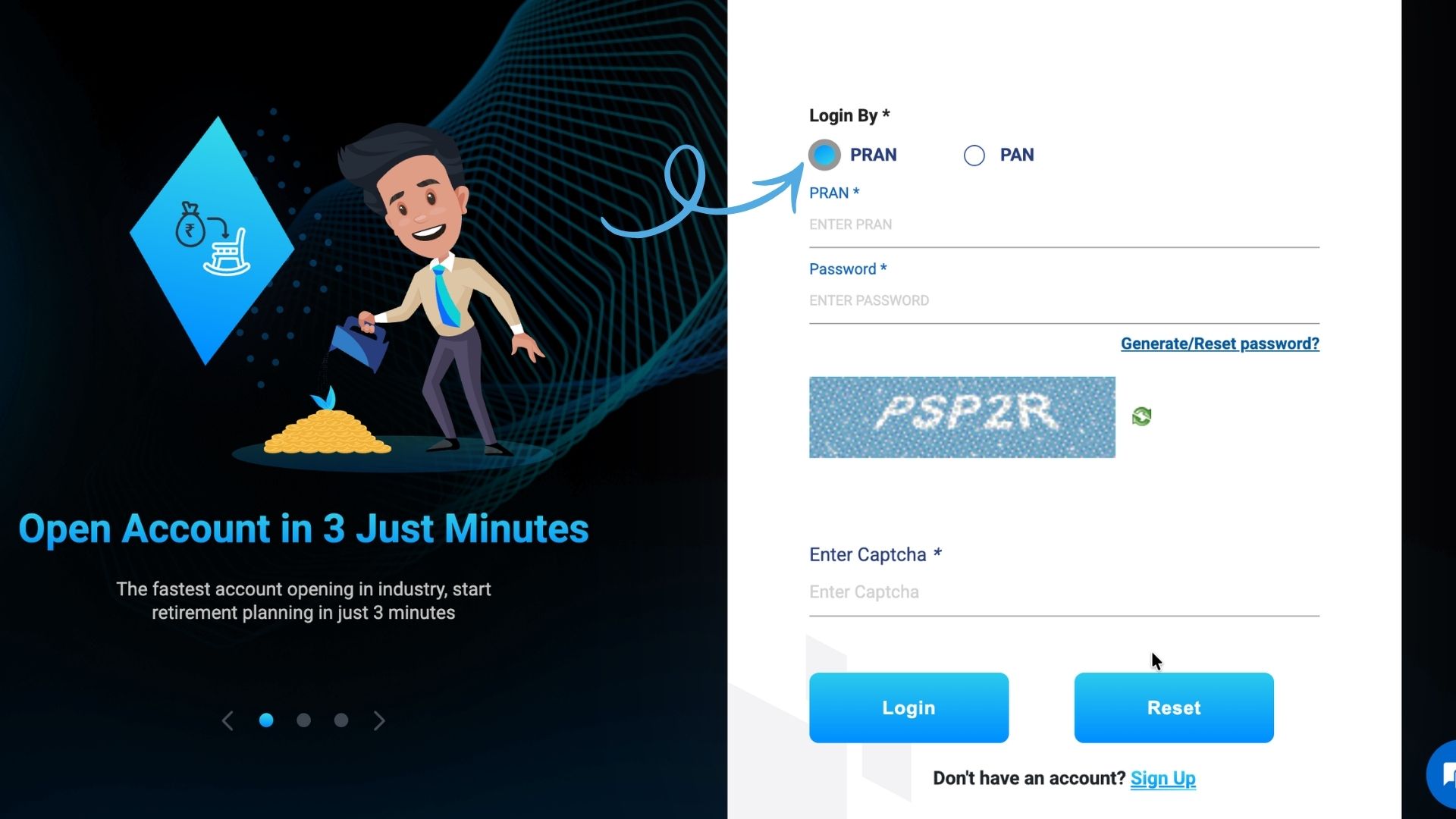
2. Log in using PAN: Enter your PAN and Date of Birth, then click Login.
Part 2: How to Change Your NPS Scheme Allocation

Once logged in, you can update your pension fund manager and adjust your asset distribution across equity, corporate bonds, and government securities or change your investment format.

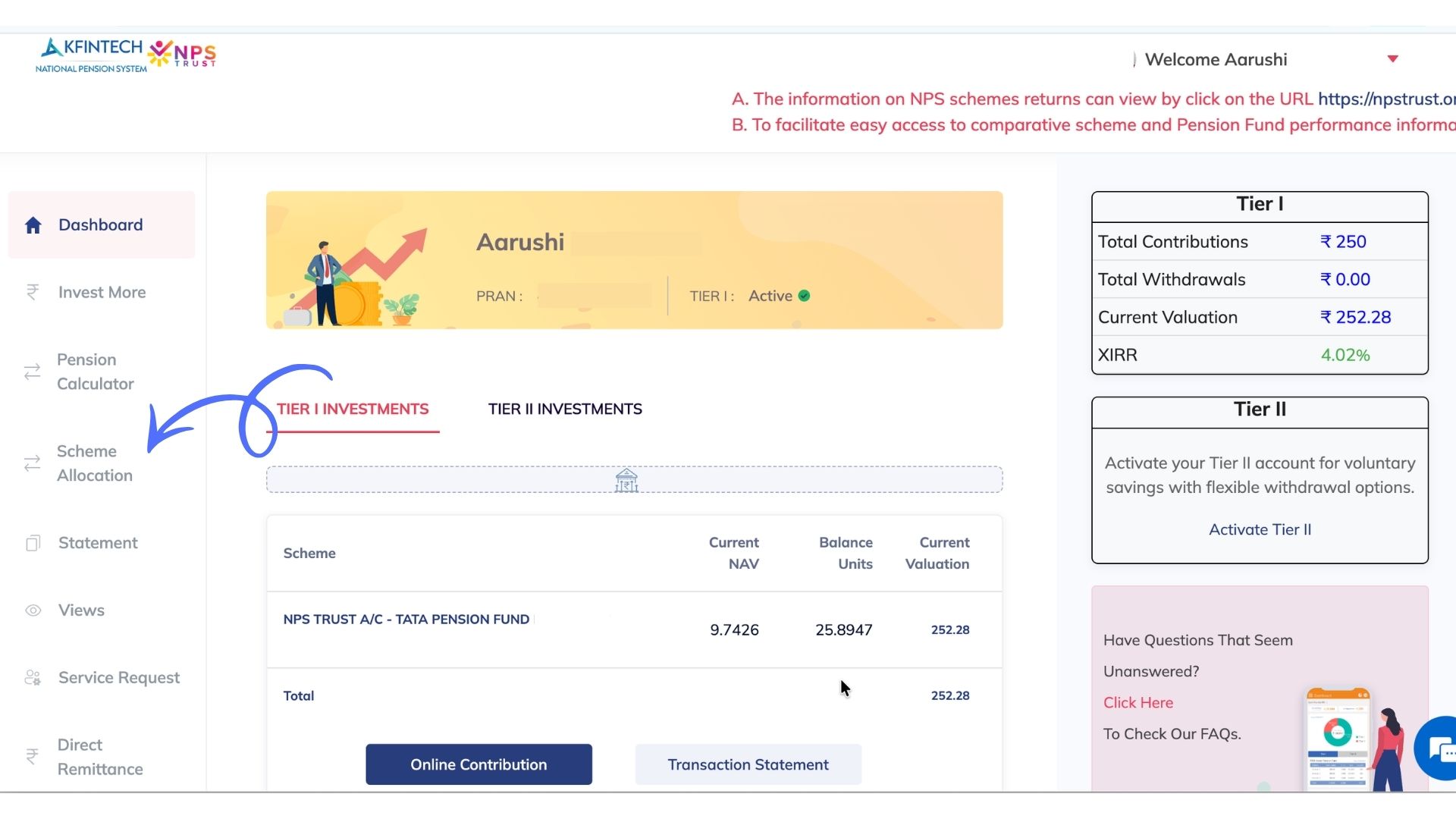
Step 1: Navigate to Scheme Allocation

From your main NPS dashboard, locate the left-hand navigation menu and select Scheme Allocation.
How to Change Asset Allocation (Common Scheme)

If your existing investments are held within the common scheme, you can switch your Pension Fund Manager once per financial year and modify your asset allocation up to 4 times per financial year.

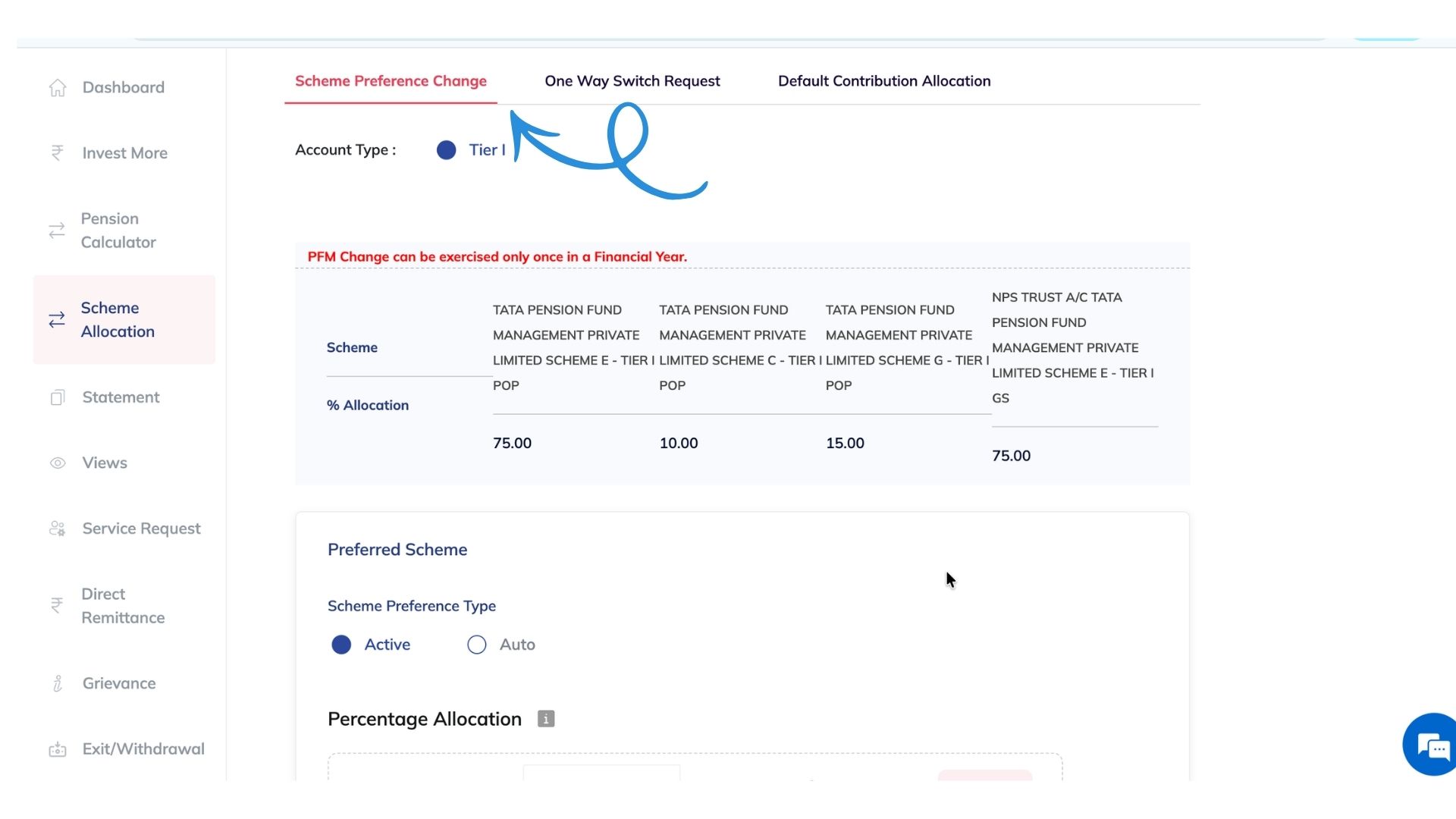
Step 2: Access the Scheme Preference Change Tab

From the top navigation bar inside the menu, select the Scheme Preference Change tab.
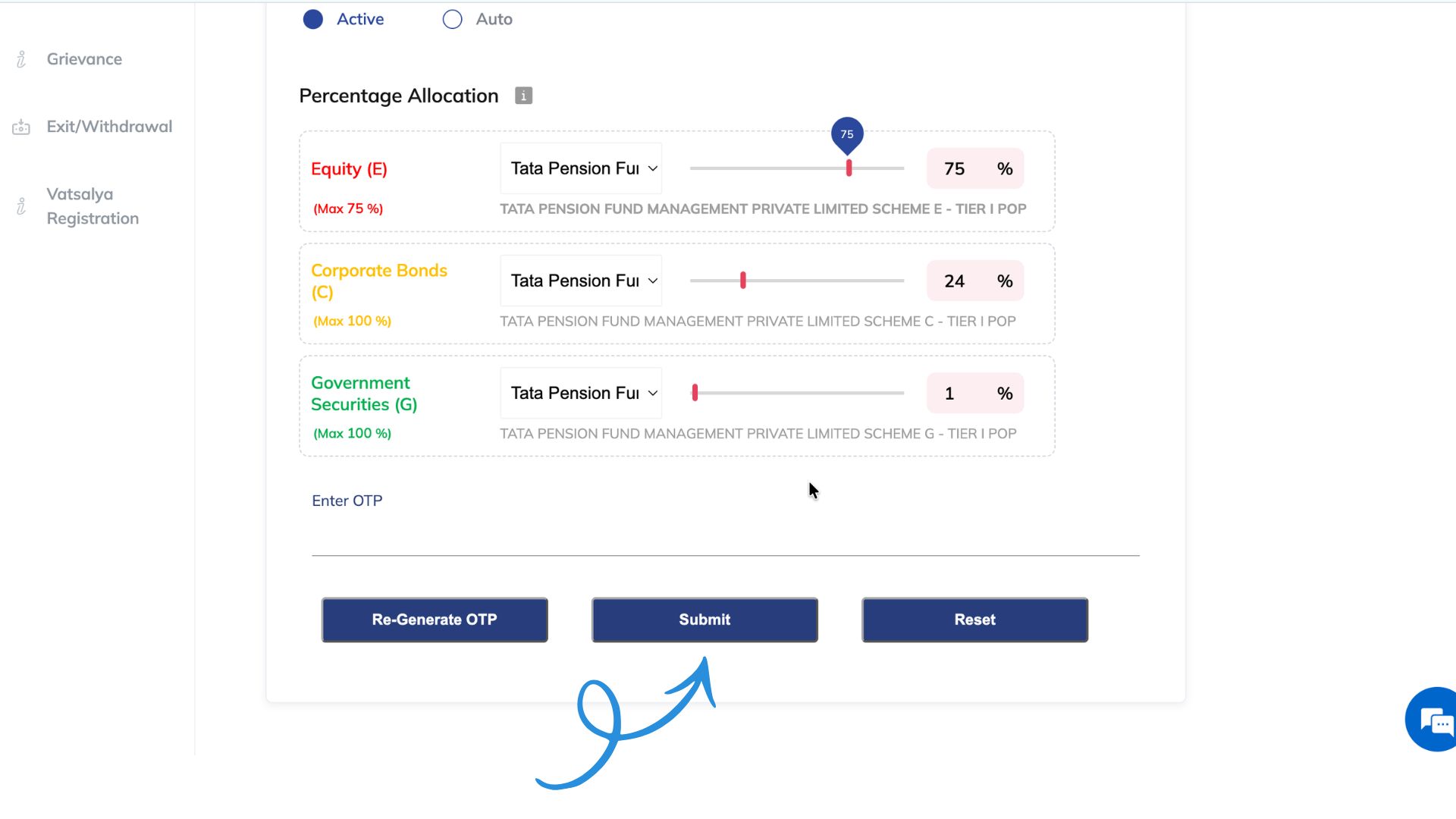
Step 3: Update Asset Allocation and Confirm

Adjust your pension fund manager or asset percentages. Click Generate OTP to receive a verification code on your registered mobile number.
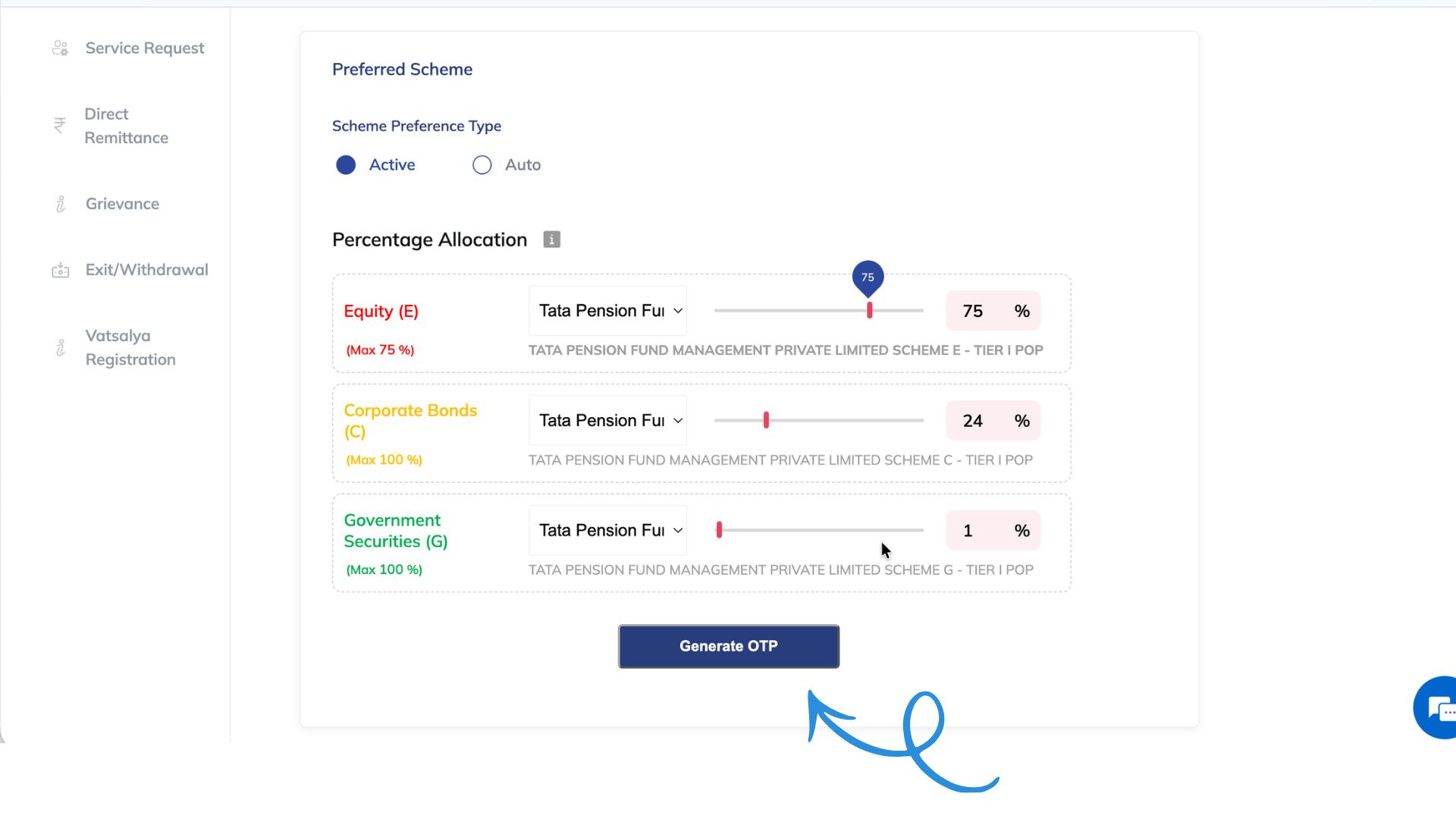
Enter the OTP and click Submit to confirm your changes.
How to Change Investment Allocation (Multi Scheme Framework - MSF)

If you invest under the new Multi Scheme Framework (MSF), you can change your fund manager for all future contributions, split investments between schemes, or allocate funds across multiple new scheme options.

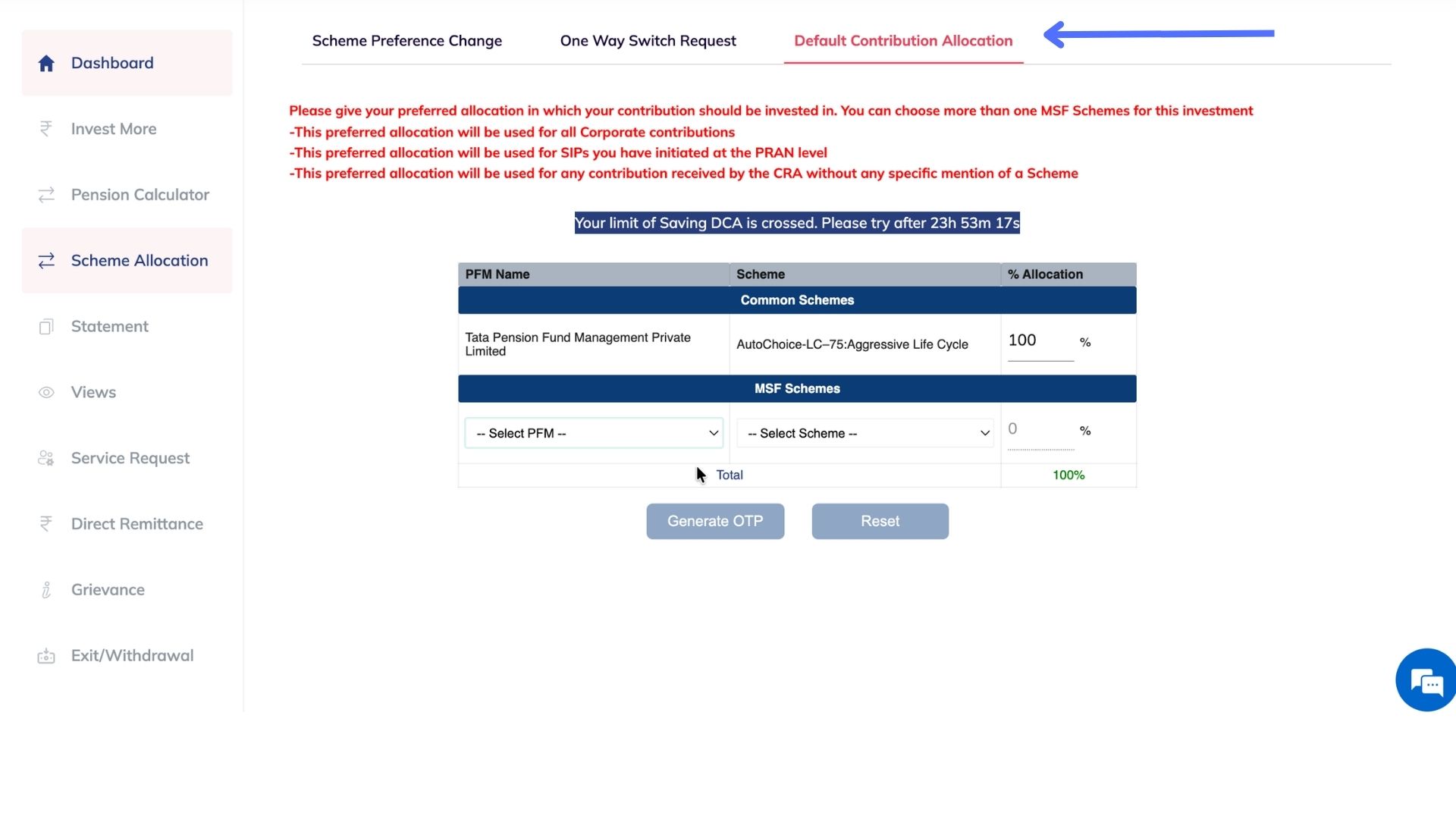
Step 4: Access Default Contribution Allocation

From the top menu bar, click on the Default Contribution Allocation tab.
Step 5: Update Future Contributions and Confirm

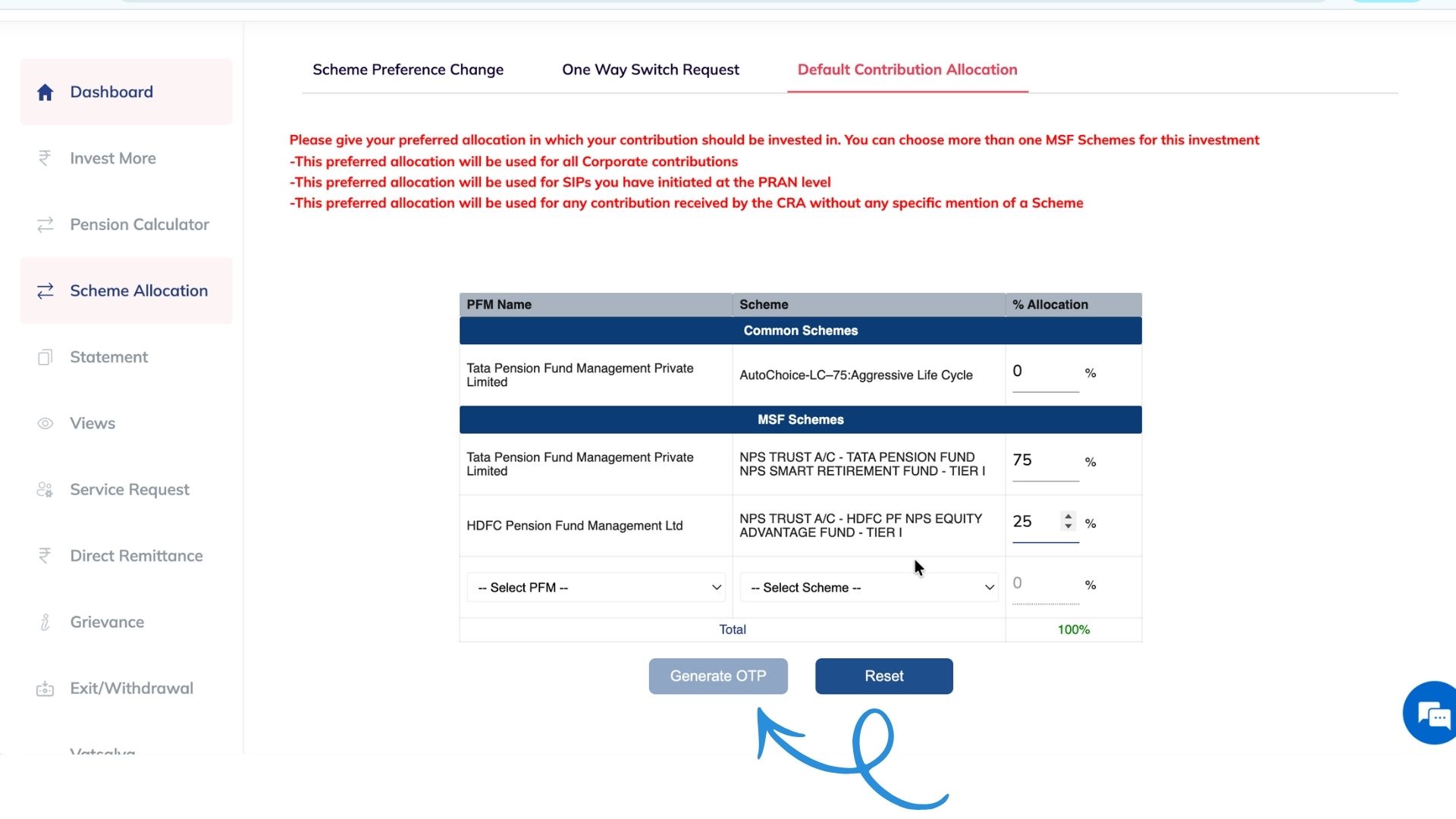
Select your preferred fund options and allocation percentages. Click Generate OTP to receive a security code via SMS. Enter the OTP and click Submit. All future NPS contributions will automatically follow this new allocation format.
Conclusion

Taking control of your retirement planning is a smart financial move. With these steps, you can easily manage your KFINTECH NPS account and ensure your investments align with your long-term goals. If you have any further questions, feel free to schedule a product advisory call with us.

You find the blog helpful, spread it among your peers
If you find anything to share regarding this specific blog, write us here
support@pensionbox.in
Published By
PensionBox

Related articles

How to OpenYour Corporate NPS Account : A Step-by-Step Guide
Setting up your Corporate National Pension System (NPS) account is now a seamless online process. Your employer has invited you to join PensionBox, marking a significant step towards securing your financial future. The NPS is a voluntary, long-term retirement savings scheme designed to provide financial security in your retirement years. This guide will walk you through the simple steps to get your NPS account started.
16 Sep 2026
How to Apply for Advance PF Withdrawal ?
Sometimes, you may need to withdraw a portion of your Provident Fund (PF) before retirement to meet urgent financial needs such as medical treatment, home construction, education, or marriage expenses.
05 Sep 2026
Guide to Tracking Your Existing NPS or PRAN
The National Pension System (NPS) is a crucial tool for securing your retirement future. If you've already opened an NPS account and been assigned a Permanent Retirement Account Number (PRAN), keeping tabs on its performance and details is essential. PensionBox offers a streamlined, user-friendly platform to consolidate and monitor all your pension assets, including your existing NPS/PRAN.
05 Sep 2026
Corporate KYC Made Easy — Complete Your KYC on PensionBox Using Kite
Completing your KYC is the first step toward activating your Corporate NPS (CNPS) account on PensionBox.
20 Nov 2025
One Vision,
2,00,000+ Stories
Every time we hear a new story, it inspires us.
Hope they inspires you as well.
"Very intuitive and smooth experience with the app. Helps me start planning my savings and retirement in a super easy manner which I assumed might be difficult thing to do."
Anjali Agarwal
PensionBox User
"Saving is an essential part of any employee’s life. With this integration, our HRMS users can directly invest and track their pension funds straight from their ESS portals, making the process seamless."
Jitendra Somani
CEO, Pocket HRMS
"Runtime HRMS is built with a vision to Create Happier Workplaces for the working population of India, and it neatly aligns with PensionBox’s vision to create financial freedom for people during and beyond their work-life."
Prashant Agarwal
Founder, Runtime Software
"Very intuitive and smooth experience with the app. Helps me start planning my savings and retirement in a super easy manner which I assumed might be difficult thing to do."
Anjali Agarwal
PensionBox User
"Saving is an essential part of any employee’s life. With this integration, our HRMS users can directly invest and track their pension funds straight from their ESS portals, making the process seamless."
Jitendra Somani
CEO, Pocket HRMS
"Runtime HRMS is built with a vision to Create Happier Workplaces for the working population of India, and it neatly aligns with PensionBox’s vision to create financial freedom for people during and beyond their work-life."
Prashant Agarwal
Founder, Runtime Software
"Very intuitive and smooth experience with the app. Helps me start planning my savings and retirement in a super easy manner which I assumed might be difficult thing to do."
Anjali Agarwal
PensionBox User
"Saving is an essential part of any employee’s life. With this integration, our HRMS users can directly invest and track their pension funds straight from their ESS portals, making the process seamless."
Jitendra Somani
CEO, Pocket HRMS
"Runtime HRMS is built with a vision to Create Happier Workplaces for the working population of India, and it neatly aligns with PensionBox’s vision to create financial freedom for people during and beyond their work-life."
Prashant Agarwal
Founder, Runtime Software
"Easy to use and smooth user interface. Pensionbox developers deserve praise. People can plan their retirement in advance with this tool. Keep up the good work guys, looking forward for some more features added to the list."
Sourabh Mishra
PensionBox User
"One of the few apps that solves the problem of tracking and investing of my retirement Corpus. Ul is sleek, customer care is great and full marks for bug free experience"
Prashant jain
User since 7 months
"PensionBox addresses a very important need for billions of Indians who do not have access to the right resources to make an informed choice and then continue to track their funds easily."
Ninad Karpe
Founder VC, 100x.VC
"Easy to use and smooth user interface. Pensionbox developers deserve praise. People can plan their retirement in advance with this tool. Keep up the good work guys, looking forward for some more features added to the list."
Sourabh Mishra
PensionBox User
"One of the few apps that solves the problem of tracking and investing of my retirement Corpus. Ul is sleek, customer care is great and full marks for bug free experience"
Prashant jain
User since 7 months
"PensionBox addresses a very important need for billions of Indians who do not have access to the right resources to make an informed choice and then continue to track their funds easily."
Ninad Karpe
Founder VC, 100x.VC
"Easy to use and smooth user interface. Pensionbox developers deserve praise. People can plan their retirement in advance with this tool. Keep up the good work guys, looking forward for some more features added to the list."
Sourabh Mishra
PensionBox User
"One of the few apps that solves the problem of tracking and investing of my retirement Corpus. Ul is sleek, customer care is great and full marks for bug free experience"
Prashant jain
User since 7 months
"PensionBox addresses a very important need for billions of Indians who do not have access to the right resources to make an informed choice and then continue to track their funds easily."
Ninad Karpe
Founder VC, 100x.VC
avatar
Over 1.8 crore users have already created
their NPS stories for a golden retirement.

News & Articles
inc42
yourStory
economicTimes
entrackr
moneycontrol
ndtv
Frequently asked questions
PensionBox is India’s first pension platform/app that helps you access, invest in, and track your NPS and other pension products with better user experience & minimum charges.

PensionBox simplifies the National Pension System(NPS), the government's pension scheme for private employees both for retail users and HRs/companies.

If you don’t have an NPS account, you can simply open your pension account within 2 minutes and if you have NPS PRAN already, you will be able track, invest and manage everything free of charge with best user experience.
Absolutely. PensionBox is fully ISO 27001 compliant with the Pension Fund Regulatory and Development Authority (PFRDA), the government body that regulates pensions in India.

We never touch or hold your money directly, your investments go safely to your chosen pension fund through approved channels.

We are built with Zerodha as POP , ensuring transparency, data security, and peace of mind. Your retirement savings are protected by regulation and secured by technology.
Banks/POPs charges high fees on account opening & every investment Even CRA apps have hidden charges/low transparency & lack timely support Pension Funds restrict pension fund choice & selection to themselves.

That’s why, PensionBox brings transparency, zero charges, timely support and freedom to select any pension fund so that you get the best experience investing in NPS & be better future ready.

That’s not it, we help you & your company together to maximise contribution and tax savings with minimal charges & best user experience.
It’s super easy to use PensionBox, just start by signing up using your browser on laptop/mobile or downloading the app on appstore or playstore.

If you are an existing zerodha user then you get a fast login or sign up using kite ID.

Once you are onboarded with kite ID, you get free access to
  • Open NPS in 2 minutes
  • Track existing NPS
  • POP shift or CRA shifting
  • Invest in one time or create SIP in NPS
  • Withdraw NPS requests & instant withdraw tier 2
  • Create your dream retirement plan
  • Open NPS Vatsalya for your kid
  • Share with HR (To unlock more tax benefits)
Tax Benefits in New Tax Regime
  • Employer Contribution:
    • Contributions made by your employer to your NPS account are tax-free up to 14% of your basic salary under Section 80CCD(2). Do connect us with your HR to enable this for you.
    Tax Benefits in Old Tax Regime
  • Self-Contribution:
    • Deduction up to ₹1.5 lakh under Section 80C.
    • Additional deduction of ₹50,000 under Section 80CCD(1B) — exclusive to NPS investments!
    • This allows you to claim a total deduction of up to ₹2 lakh every year on your NPS contributions.
  • Employer Contribution:
    • Contributions made by your employer to your NPS account are tax-free up to 10% of your basic salary (Basic + DA) under Section 80CCD(2). Do connect us with your HR to enable this for you.
    • This is over and above your personal deduction limits, giving you extra tax efficiency.
We understand NPS can be confusing, complex and there is a lot of information out there to believe in. Don’t worry, our team is here to help you with the right information.

Feel free to book a free call to learn more about NPS, NPS Vatsalya, Corporate NPS & PensionBox or contact the support team.

Blogs

PensionBox is registered trademark managed & owned by Asht Capital Private Limited. CIN -U67190UP2021PTC142016. All Rights Reserved.

PensionBox is India’s first pension startup for the private employed workforce. PensionBox is ISO 27001 certified and approved by PFRDA for the National Pension System. Recognized as a startup by the Department for Promotion of Industry and Internal Trade, Certificate under StartupIndia Initiative DIPP80990 & StartinUP Initiative. Incubated & supported by UPES Council for Innovation and Entrepreneurship (UCIE).

PensionBox works as Technology Platform/Partner with Zerodha Broking Limited, Point of Presence (POP) as Pension Agent under PFRDA (PoP) Regulations 2023 to enable NPS account opening, transacting funds, manage account under All Citizen and Corporate NPS in India.

Grievance Redressal as per Regulation 31 of PFRDA (Redressal of Subscriber Grievance) Regulations, 2015:
The details of the Ombudsman appointed are available on the PFRDA website - www.pfrda.org.in At present, Shri Narender Kumar Bhola has been appointed as the new Ombudsman in terms of the PFRDA (Redressal of Subscriber Grievance) Regulations, 2015.


Details of the ombudsman are as under:

Shri Narender Kumar Bhola
Pension Fund Regulatory and Development Authority
B-14/A, Chatrapati Shivaji Bhawan,
Qutab Institutional Area, Katwaria Sarai, New Delhi- 110016
Chhatrapati Shivaji Bhawan,
Id: ombudsman@pfrda.org.in
Landline No.: 011 - 26517507 Ext : 188
Grievance Redressal Officer
Ms. Sruthi Nair
Email: sruthi@pensionbox.in
Name: Kuldeep Parashar
Email: kuldeep@pensionbox.in
Phone: +91 8445450050

Registered Office Address: Asht Capital Private Limited, House 2, Vaishali Puram, Firozabad Road, Tundla, Uttar Pradesh, 283204
Bangalore Office Address: First Floor, 680, 15th Cross Rd, Jeewan Griha Colony, 2nd Phase, J. P. Nagar, Bengaluru, Karnataka 560078 | support@pensionbox.in | +918445450050

Copyright ©2026 PensionBox, All rights reserved.