
How to Merge Multiple EPF Member IDs Under One UAN

If you’ve worked in more than one organization, you might have multiple EPF Member IDs linked to your Universal Account Number (UAN). To keep your provident fund records organized and ensure your contributions are reflected correctly, it’s important to merge all your Member IDs into a single account. This guide walks you through each step to easily merge your EPF Member IDs online using the EPFO portal.
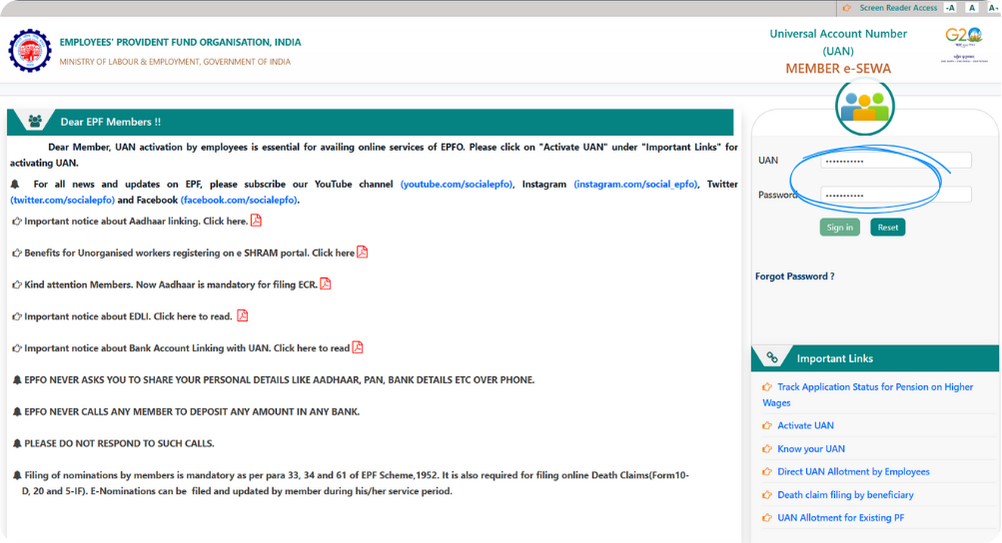
Step 1: Sign in with Your UAN & Password
Visit the EPFO Member Portal and sign in using your UAN and password.
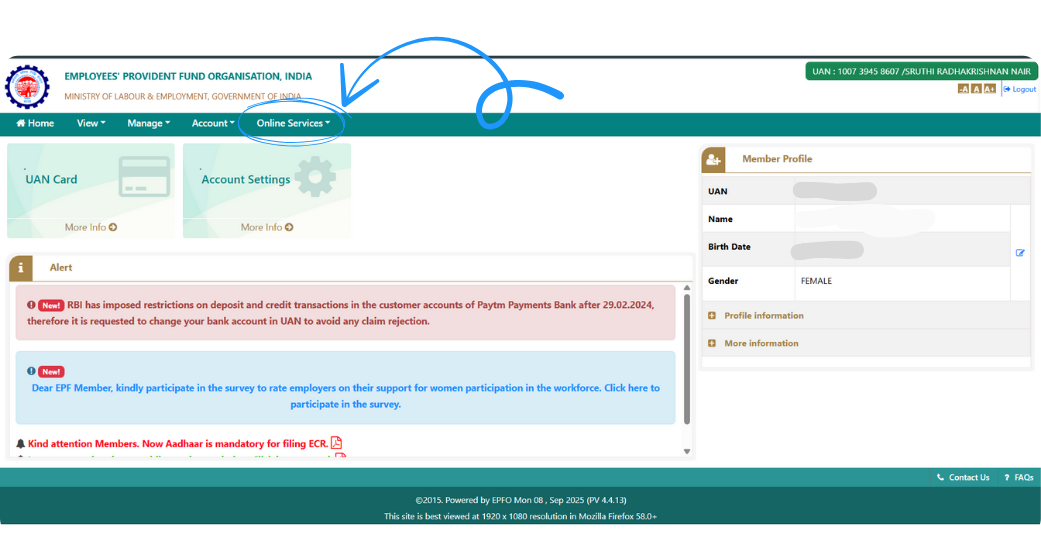
Step 2: Open the Online Services Menu
Once you’re logged in, go to the top menu and click on Online Services. This section contains all claim and account management options.
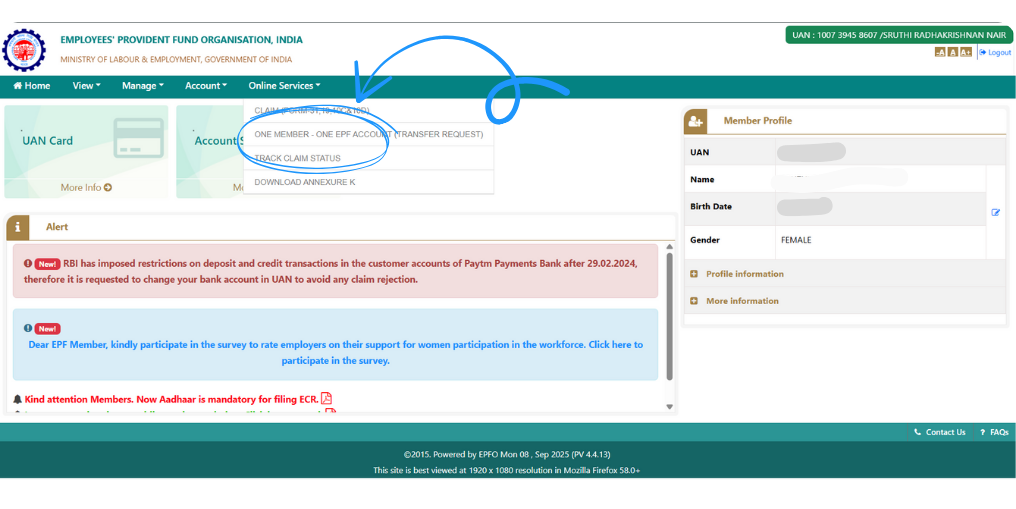
Step 3: Select “One Member – One EPF Account”
From the dropdown list, select One Member – One EPF Account (Transfer Request). This is the option used for merging or transferring your PF accounts from previous employers.
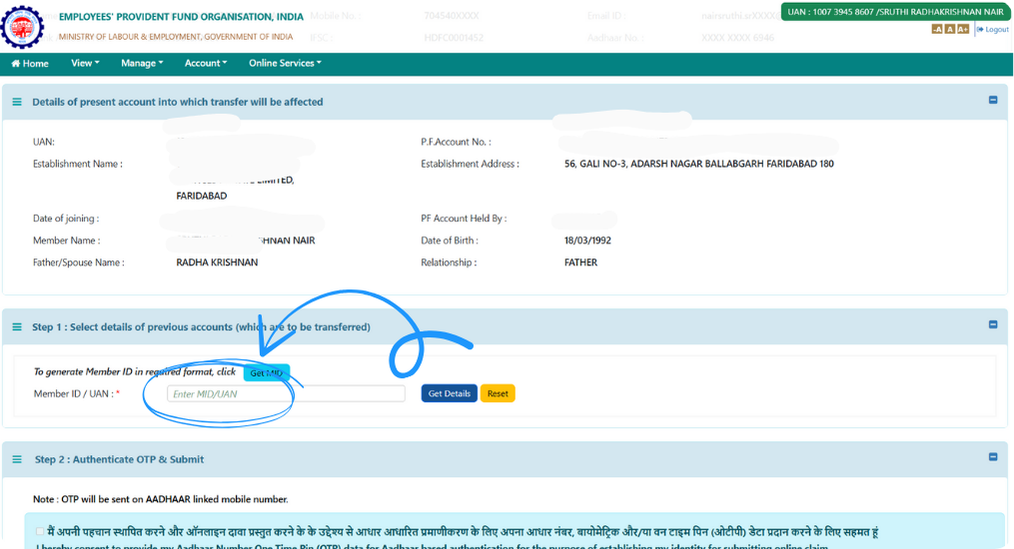
Step 4: Enter Your UAN
In the field provided, enter your UAN number. The system will treat this as your primary account to which all older Member IDs will be merged.
Step 5: Click on “Get Details”
After entering your UAN, click Get Details. The portal will fetch your employment history and display all Member IDs associated with your UAN. If no details appear, it could mean that your earlier PF accounts aren’t yet linked with your UAN. You may need to contact your previous employer or local EPFO office to update those records.
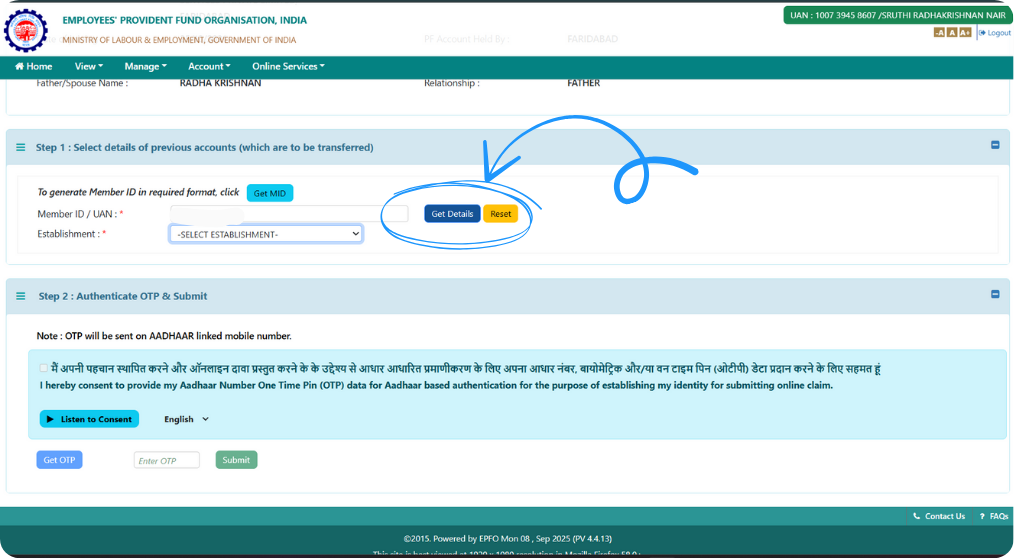
Step 6: Select the Member IDs You Want to Merge
Review the list of your past employer accounts and select the Member IDs you wish to merge into your current EPF account.
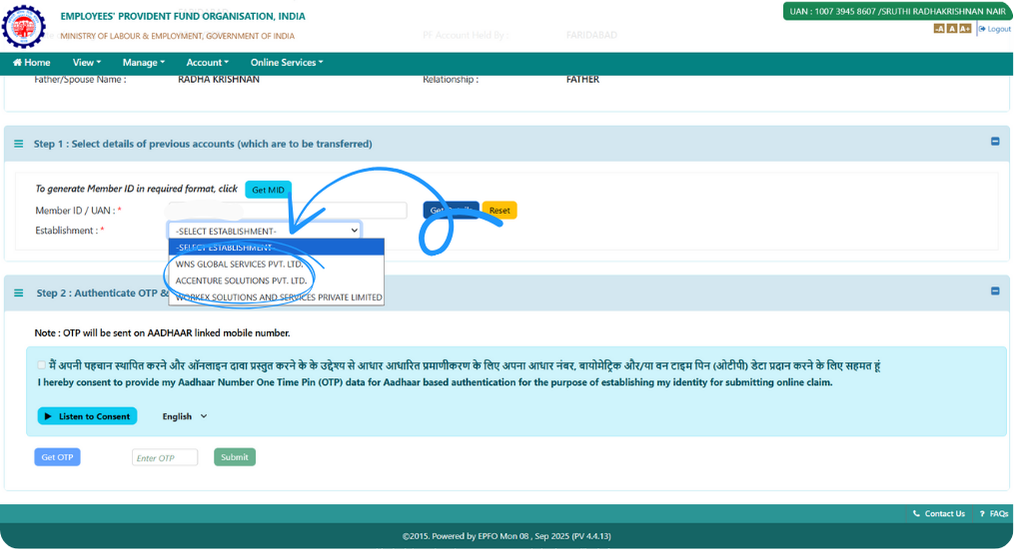
Step 7: Confirm Selection by Checking Boxes
Tick the checkboxes next to the selected Member IDs. This action confirms which accounts will be merged into your active UAN.
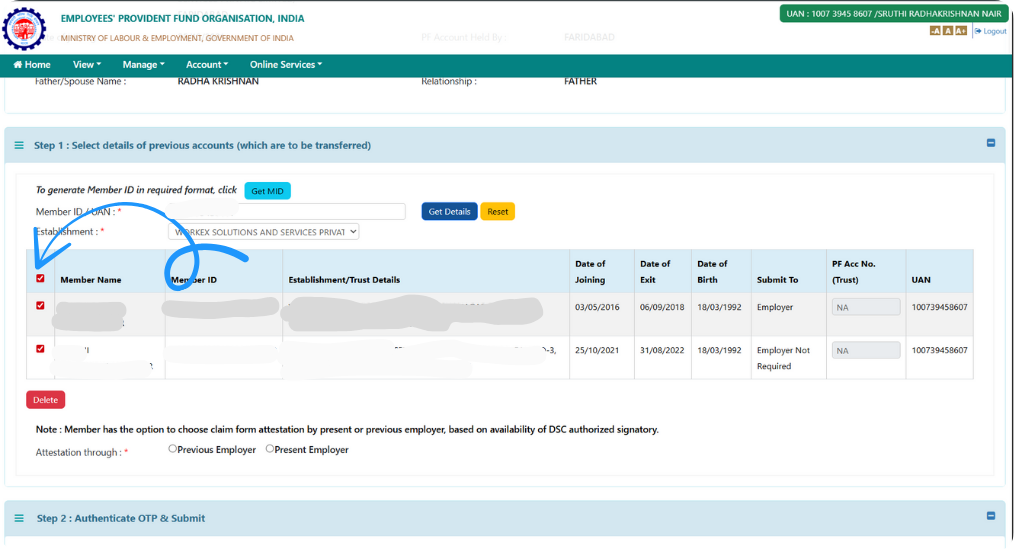
Step 8: Generate OTP for Verification
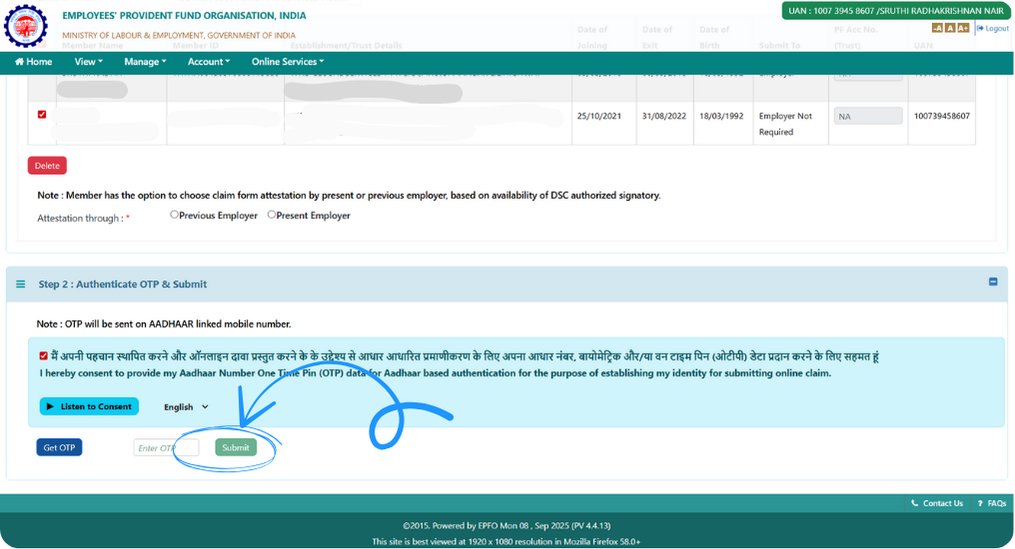
Click on Get OTP. An OTP will be sent to your mobile number registered with the EPFO portal. This ensures that only the rightful account holder can request a merge.
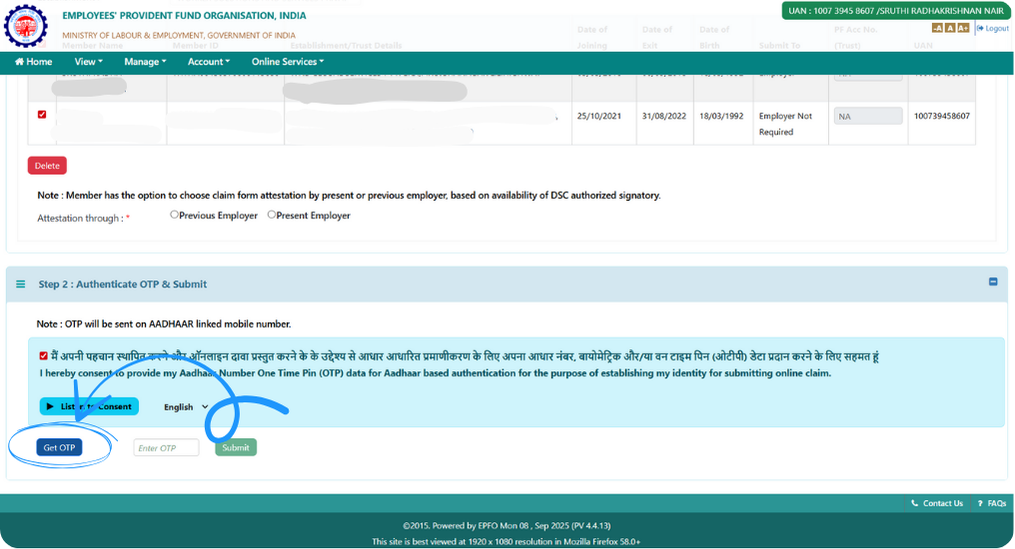
Step 9: Enter OTP and Submit Your Request
Enter the OTP received and click Submit. Once submitted, your merge request will be successfully registered. You’ll receive an acknowledgement message or reference number — save it for tracking. The EPFO will validate your request, and the merging process may take a few working days.
Congratulations! You’ve now successfully initiated the EPF Member ID merge process. Once approved, your previous PF balances and service details will automatically consolidate under your primary UAN — making your retirement savings easier to track and manage.
2,00,000+ Stories
Hope they inspires you as well.

their NPS stories for a golden retirement.







PensionBox simplifies the National Pension System(NPS), the government's pension scheme for private employees both for retail users and HRs/companies.
If you don’t have an NPS account, you can simply open your pension account within 2 minutes and if you have NPS PRAN already, you will be able track, invest and manage everything free of charge with best user experience.
We never touch or hold your money directly, your investments go safely to your chosen pension fund through approved channels.
We are built with Zerodha as POP , ensuring transparency, data security, and peace of mind. Your retirement savings are protected by regulation and secured by technology.
That’s why, PensionBox brings transparency, zero charges, timely support and freedom to select any pension fund so that you get the best experience investing in NPS & be better future ready.
That’s not it, we help you & your company together to maximise contribution and tax savings with minimal charges & best user experience.
If you are an existing zerodha user then you get a fast login or sign up using kite ID.
Once you are onboarded with kite ID, you get free access to
- Open NPS in 2 minutes
- Track existing NPS
- POP shift or CRA shifting
- Invest in one time or create SIP in NPS
- Withdraw NPS requests & instant withdraw tier 2
- Create your dream retirement plan
- Open NPS Vatsalya for your kid
- Share with HR (To unlock more tax benefits)
- Employer Contribution:
- Contributions made by your employer to your NPS account are tax-free up to 14% of your basic salary under Section 80CCD(2). Do connect us with your HR to enable this for you.
Tax Benefits in Old Tax Regime - Self-Contribution:
- Deduction up to ₹1.5 lakh under Section 80C.
- Additional deduction of ₹50,000 under Section 80CCD(1B) — exclusive to NPS investments!
- This allows you to claim a total deduction of up to ₹2 lakh every year on your NPS contributions.
- Employer Contribution:
- Contributions made by your employer to your NPS account are tax-free up to 10% of your basic salary (Basic + DA) under Section 80CCD(2). Do connect us with your HR to enable this for you.
- This is over and above your personal deduction limits, giving you extra tax efficiency.
Feel free to book a free call to learn more about NPS, NPS Vatsalya, Corporate NPS & PensionBox or contact the support team.