
How to Apply for Advance PF Withdrawal ?

Sometimes, you may need to withdraw a portion of your Provident Fund (PF) before retirement to meet urgent financial needs such as medical treatment, home construction, education, or marriage expenses.
In such cases, you can apply for a partial withdrawal (advance) using Form-31.
Here’s a clear, step-by-step guide to help you submit your PF Advance Request online through the EPFO portal.
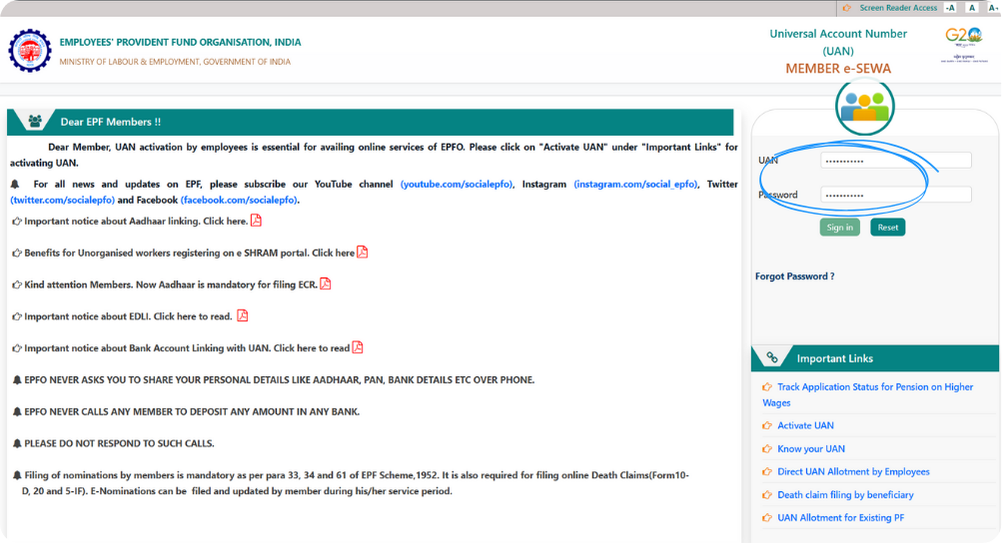
Step 1: Login with Your UAN & Password
Go to the official EPFO Member Portal and sign in using your Universal Account Number (UAN) and password.
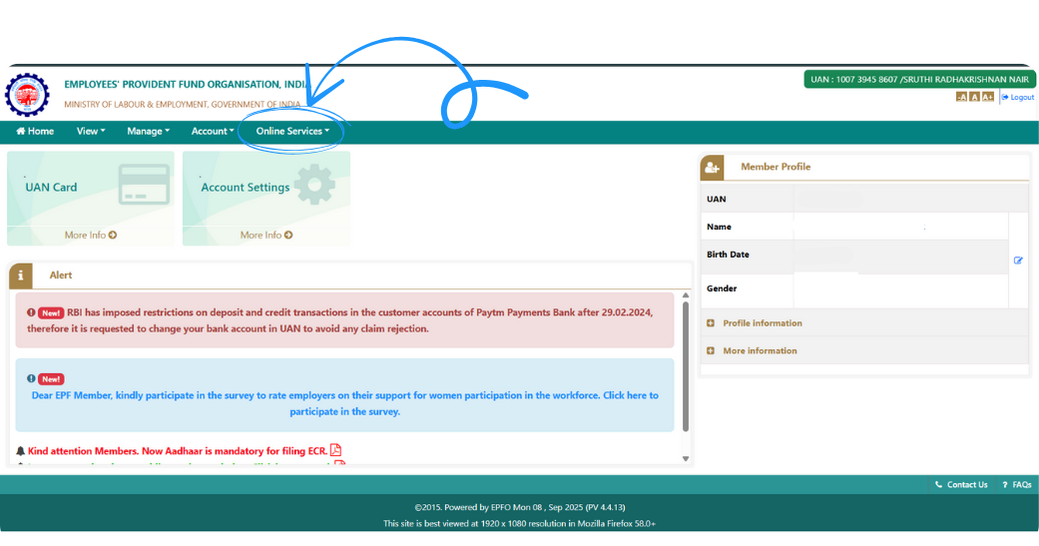
Step 2: Click on “Online Services”
Once logged in, open the Online Services tab from the top menu.
This section allows you to access all withdrawal and claim options.
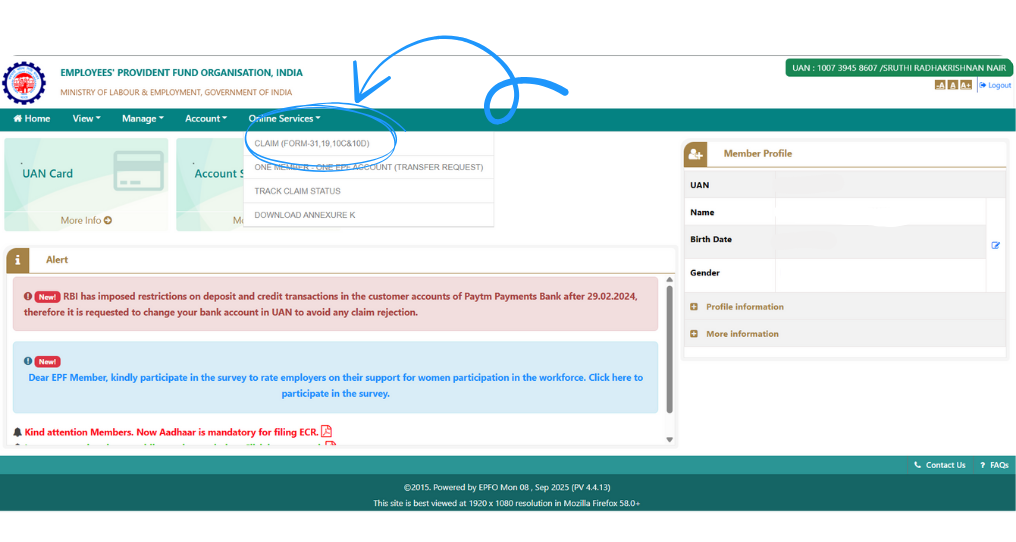
Step 3: Select “Claim (Form-31)”
Click on “Claim (Form-31, 19, 10C & 10D)” from the dropdown menu.
This page lists all claim forms available for PF withdrawals, including Form-31 for partial withdrawal.
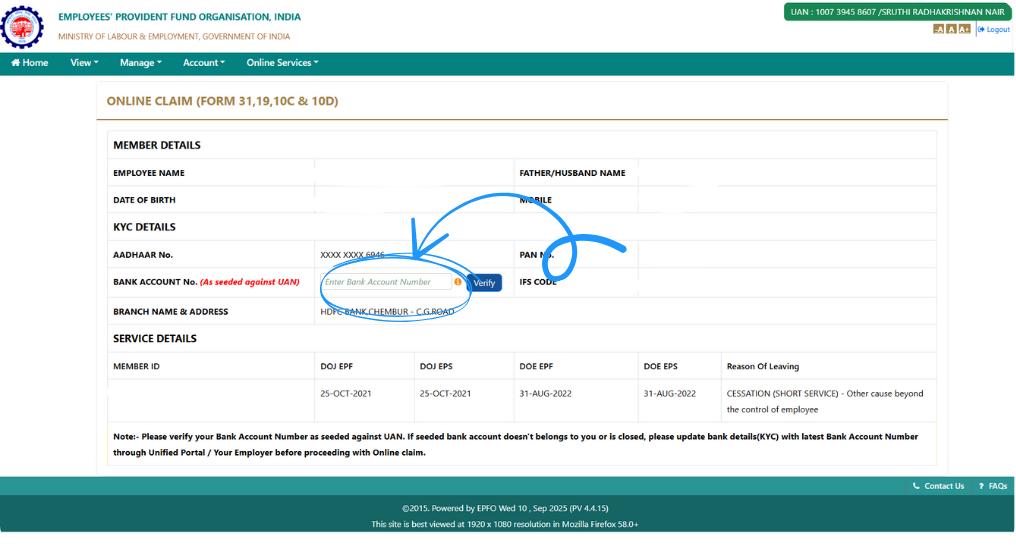
Step 4: Enter and Verify Bank Details
Provide the bank account number linked to your PF account and click Verify.
This step ensures that your withdrawal amount will be credited to the correct bank account.
Note: Make sure your account number, IFSC code, and name exactly match your EPFO records to avoid rejection.
Step 5: Proceed for Online Claim
Once the bank details are verified successfully, click on “Proceed for Online Claim.”
This will open up the PF claim form for you to continue your request.
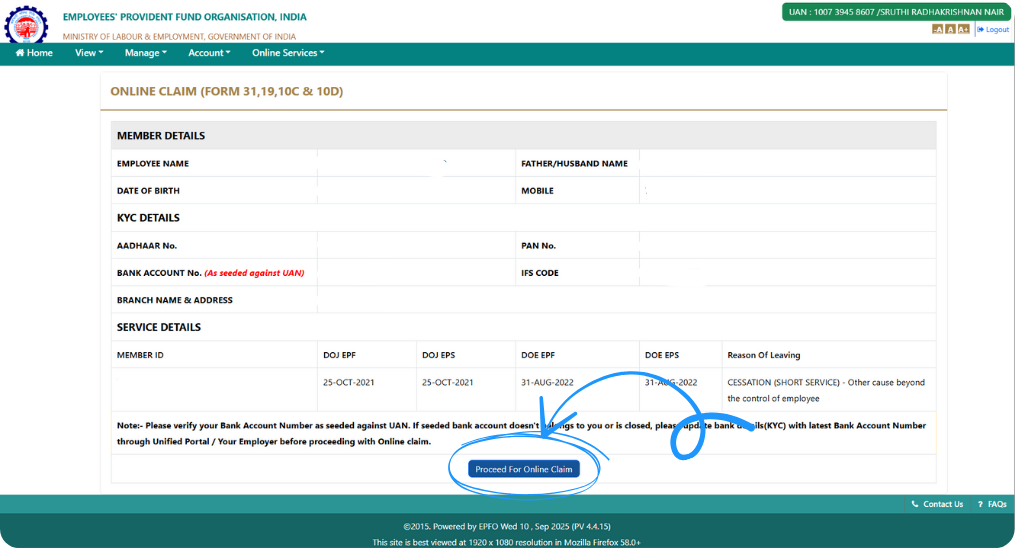
Step 6: Select Your Claim Type
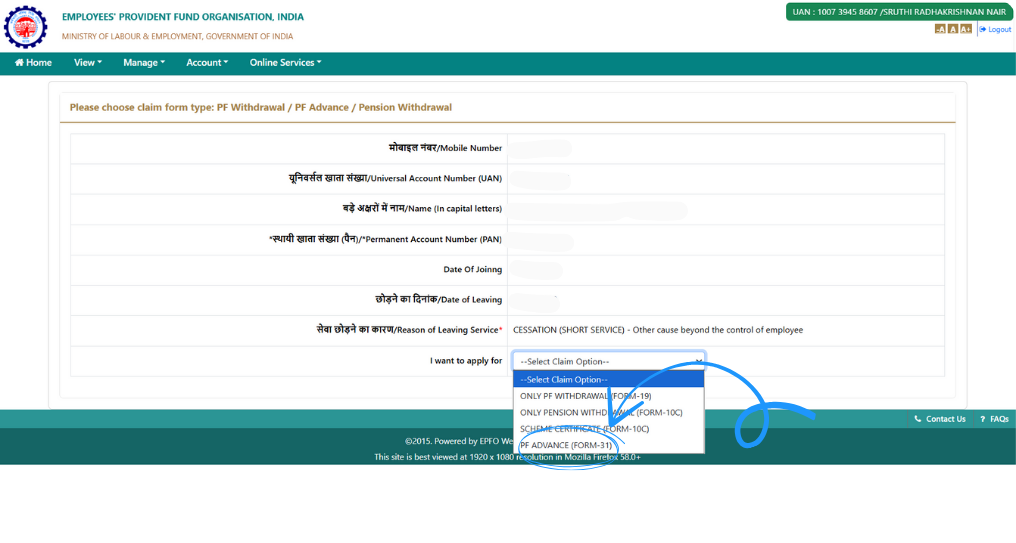
From the list of claim options displayed, choose PF Advance (Form-31).
This option allows you to withdraw funds for specific, approved purposes.
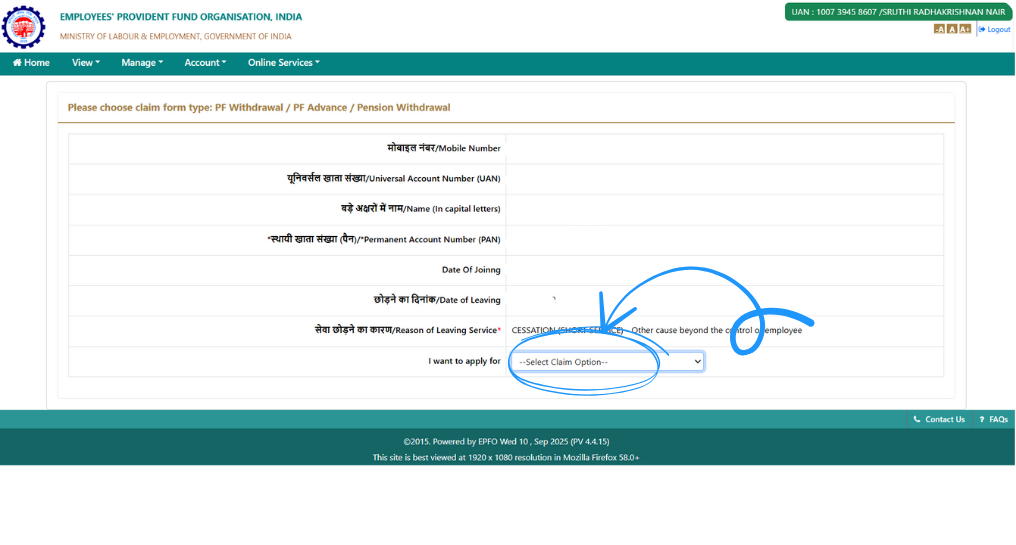
Step 7: Confirm “PF Advance (Form-31)”
Select PF Advance (Form-31) again when prompted.
This confirms that you are requesting a partial withdrawal from your PF account, not a full settlement.
Step 8: Choose Your Member ID
If your UAN has multiple member IDs (for different employers), select the Member ID against which you want the advance to be processed.
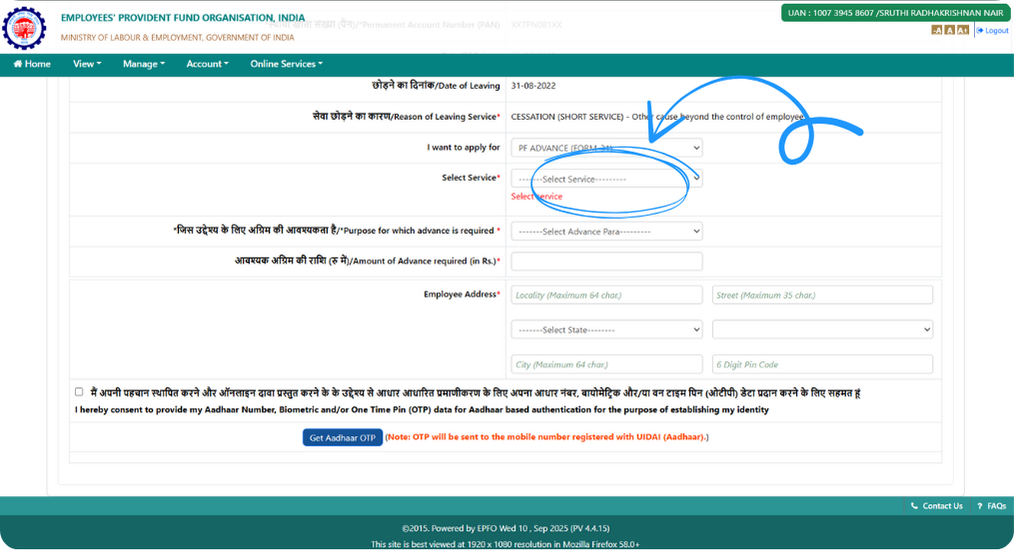
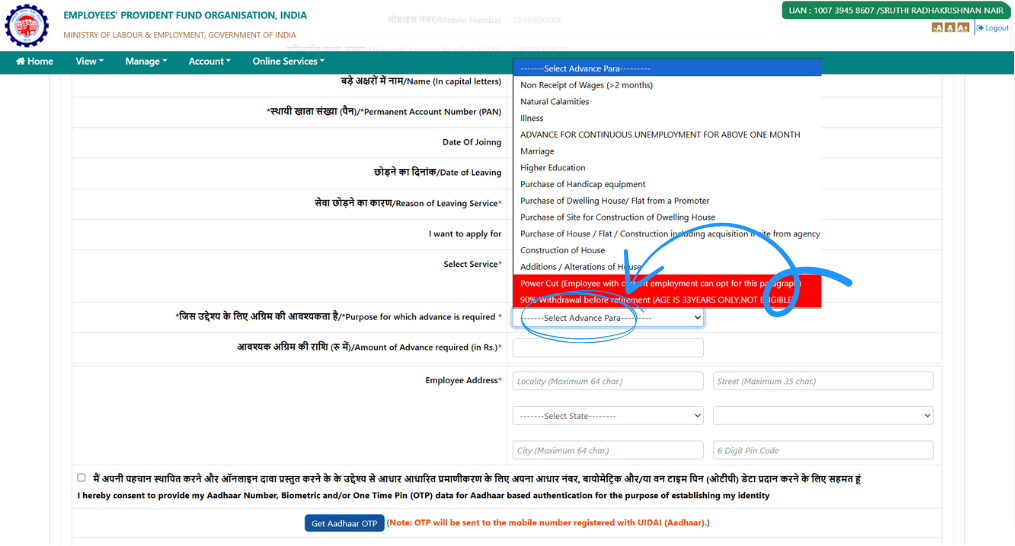
Step 9: Select the Purpose for Advance
From the dropdown menu, select the Reason for your PF advance — such as:
- Medical emergencies
- Education or marriage expenses
- Construction or purchase of a house
- Unemployment or financial hardship
Depending on your selection, the portal may request additional information or documents.
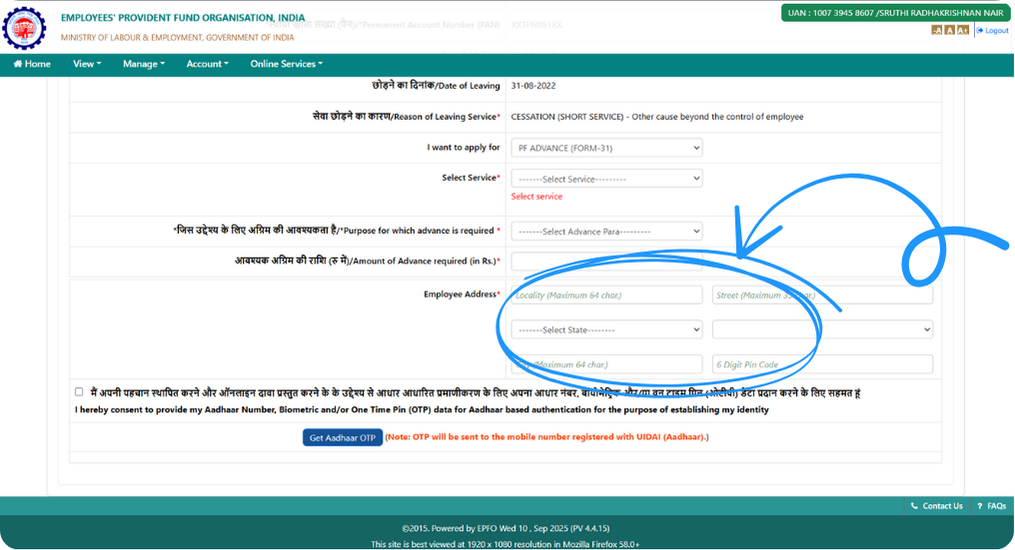
Step 10: Enter Your Aadhaar Address
Enter your address exactly as it appears on your Aadhaar Card.
This detail is essential for identity verification and must match your Aadhaar records.
Step 11: Get Aadhaar OTP and Submit the Claim
Click on Get Aadhaar OTP. You’ll receive an OTP on your Aadhaar-linked mobile number — enter the OTP and click Submit to complete the process.
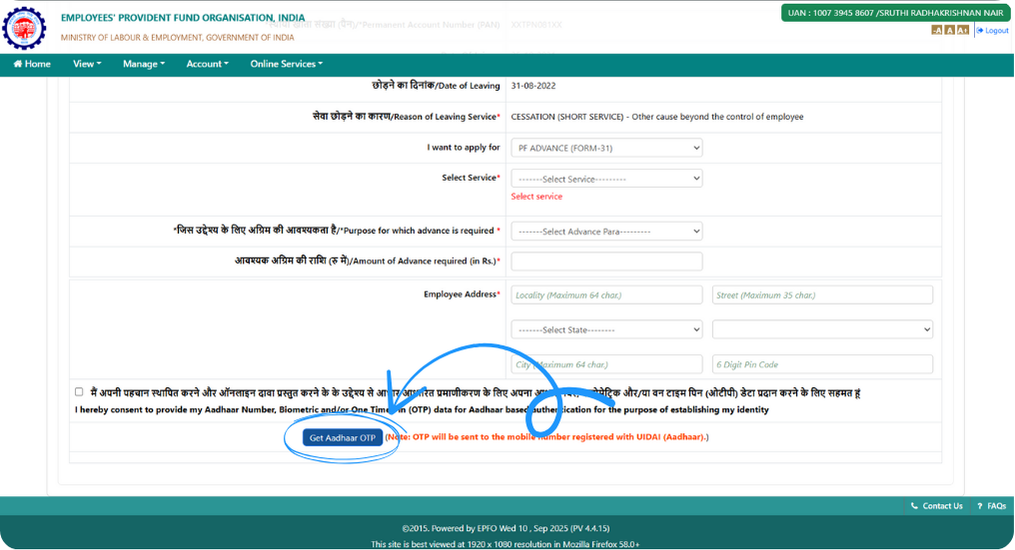
Congratulations! 🎉 You’ve successfully submitted your PF Advance (Form-31) request online.You’ll receive an Acknowledgement or Reference number on the screen. Save it for future tracking.
2,00,000+ Stories
Hope they inspires you as well.

their NPS stories for a golden retirement.







PensionBox simplifies the National Pension System(NPS), the government's pension scheme for private employees both for retail users and HRs/companies.
If you don’t have an NPS account, you can simply open your pension account within 2 minutes and if you have NPS PRAN already, you will be able track, invest and manage everything free of charge with best user experience.
We never touch or hold your money directly, your investments go safely to your chosen pension fund through approved channels.
We are built with Zerodha as POP , ensuring transparency, data security, and peace of mind. Your retirement savings are protected by regulation and secured by technology.
That’s why, PensionBox brings transparency, zero charges, timely support and freedom to select any pension fund so that you get the best experience investing in NPS & be better future ready.
That’s not it, we help you & your company together to maximise contribution and tax savings with minimal charges & best user experience.
If you are an existing zerodha user then you get a fast login or sign up using kite ID.
Once you are onboarded with kite ID, you get free access to
- Open NPS in 2 minutes
- Track existing NPS
- POP shift or CRA shifting
- Invest in one time or create SIP in NPS
- Withdraw NPS requests & instant withdraw tier 2
- Create your dream retirement plan
- Open NPS Vatsalya for your kid
- Share with HR (To unlock more tax benefits)
- Employer Contribution:
- Contributions made by your employer to your NPS account are tax-free up to 14% of your basic salary under Section 80CCD(2). Do connect us with your HR to enable this for you.
Tax Benefits in Old Tax Regime - Self-Contribution:
- Deduction up to ₹1.5 lakh under Section 80C.
- Additional deduction of ₹50,000 under Section 80CCD(1B) — exclusive to NPS investments!
- This allows you to claim a total deduction of up to ₹2 lakh every year on your NPS contributions.
- Employer Contribution:
- Contributions made by your employer to your NPS account are tax-free up to 10% of your basic salary (Basic + DA) under Section 80CCD(2). Do connect us with your HR to enable this for you.
- This is over and above your personal deduction limits, giving you extra tax efficiency.
Feel free to book a free call to learn more about NPS, NPS Vatsalya, Corporate NPS & PensionBox or contact the support team.