
PF Final Settlement (Form 19): Time Taken, Steps & 2026 Rules

When you retire or leave a job for good, you can claim the full amount in your Provident Fund (PF) account through the EPFO portal. This is your PF final settlement, and the online form for it is Form-19.
This guide explains when you can apply under the 2026 rules, how long EPFO takes, how the money is taxed, and then walks you through the Form-19 submission step by step, so your funds reach your bank account without delay.
PF final settlement rules as of October 2026
| Rule | What it means for you |
|---|---|
| Claim right away | Retirement after 55, permanent incapacity for work, moving abroad, retrenchment, or a voluntary retirement scheme |
| Resigned from your job | Full withdrawal only after 12 continuous months without work in any EPF-covered establishment (no wait for women who resign to get married) |
| Settlement time | EPFO must pay a complete claim within 20 days of receiving it |
| Tax | Tax-free after 5 years of continuous service; otherwise taxable, with 10% TDS if the payout is ₹50,000 or more |
| Pension (EPS) money | Not part of Form-19; claimed separately with Form-10C |
When can you claim your PF final settlement?
Under the Employees' Provident Funds Scheme, 2026, you can withdraw your full PF balance straight away:
- on retirement after the age of 55;
- on retirement because of permanent and total incapacity for work;
- just before you migrate abroad to settle permanently or to take up a job abroad;
- when your service ends through retrenchment or a voluntary retirement scheme.
If you have simply resigned, you can claim the full balance only after you have not worked in any EPF-covered establishment for 12 continuous months before the date you apply. Women who resign to get married do not have to wait. A shorter two-month wait applies only in a few special cases, such as being moved by your employer to a unit that is not covered by EPF.
Planning to join another job soon? Transfer your PF instead of withdrawing it. If you withdraw the full balance and later join another EPF-covered employer, you start again as a fresh member. Here is how to merge your old PF accounts into your current one. If you only need part of your money while you are still working, a PF advance withdrawal is the better route.
How many days does PF final settlement take?
EPFO must settle a complete claim and pay the money within 20 days of receiving it. If something is missing from your claim, EPFO has to tell you within the same 20 days. If a complete claim is delayed beyond 20 days without good reason, penal interest of 12% a year may be charged on the amount.
Is your PF final settlement taxable?
Your PF final settlement is tax-free if you have 5 or more years of continuous service. Service with earlier employers counts, as long as that PF was transferred into your current account. It is also tax-free if your job ended because of ill-health, the closure or contraction of your employer's business, or another reason beyond your control.
In other cases the amount is taxable, and EPFO deducts 10% TDS when the total payout is ₹50,000 or more. If the tax on your estimated total income for the year is nil, you can upload a self-declaration while filing the claim (Step 8 below) so that TDS is not deducted.
For example, say you resign after 3 years and your PF balance is ₹1,20,000. The payout is taxable and above ₹50,000, so EPFO deducts 10%, which is ₹12,000, and pays you ₹1,08,000. Had you completed 5 years of continuous service, the same ₹1,20,000 would be paid in full, with no TDS.
What about your pension (EPS) money?
Form-19 settles only your PF. The pension part of your contributions is handled separately. If you have less than 10 years of pension service, you can claim it as a withdrawal benefit with Form-10C, but only after 36 months from the date your last contribution became due, or on reaching superannuation age if that comes first. See how to claim your pension withdrawal with Form-10C.
If your employer runs its own PF trust
Some employers manage PF through their own trust instead of depositing it with EPFO. These are called exempted establishments. Your PF is then managed by the employer's board of trustees, and the trust settles your claim, so ask your HR how to file it. The trust still has to offer online claims and settle them within the same time limit as EPFO. To move this money to EPFO when you change jobs, see how to transfer PF from a private trust to EPFO.
Before you apply
- Your UAN is activated and you can log in to the EPFO Member Portal.
- Your Aadhaar, PAN and bank account are linked to your UAN and verified.
- Your previous employer has updated your date of exit.
- The mobile number linked to your Aadhaar is active, as you'll need it for OTP verification.
How to submit Form-19 online: step by step
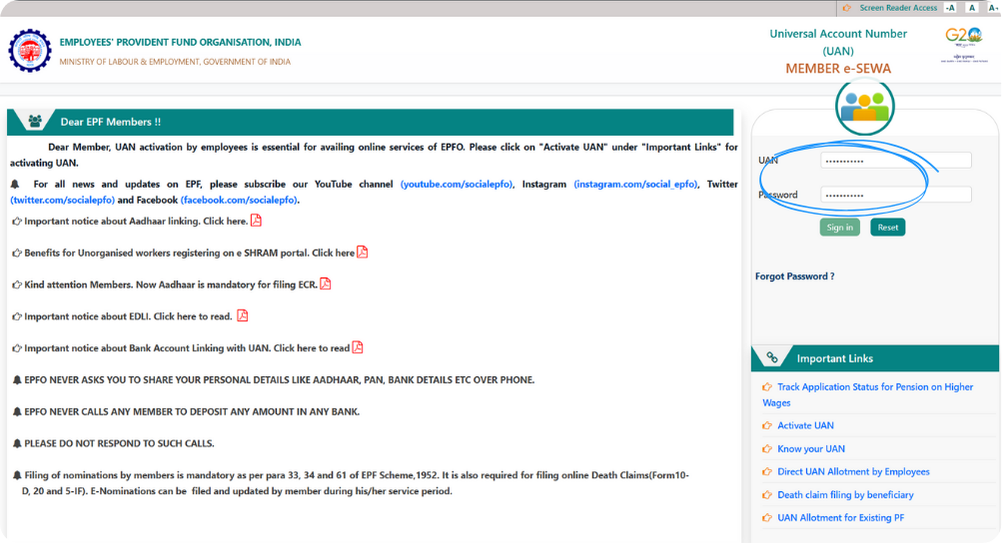
Step 1: Log in with Your UAN & Password
Visit the official EPFO Member Portal and log in using your Universal Account Number (UAN) and password.
Make sure your mobile number linked with Aadhaar is active, as you’ll need it for OTP verification later.
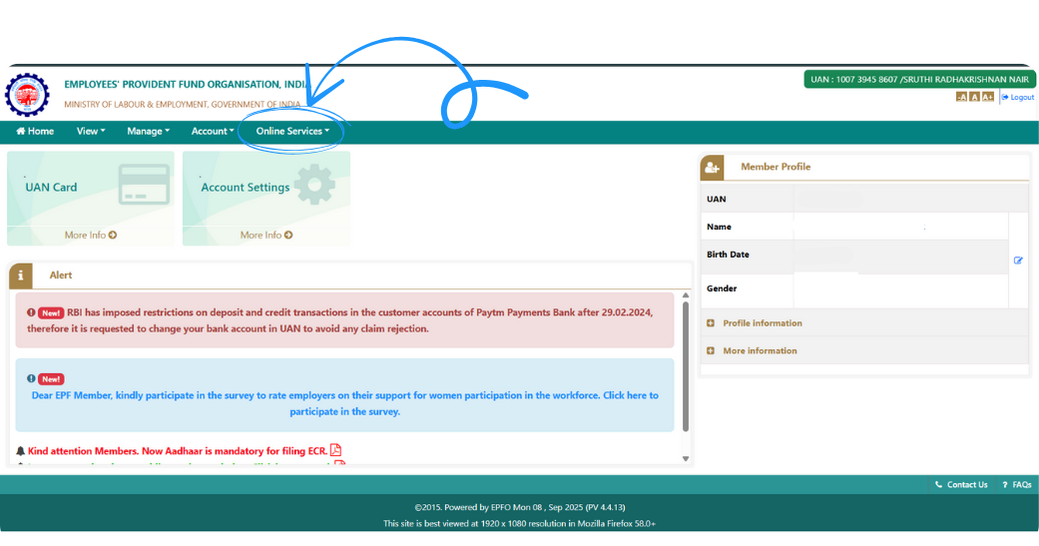
Step 2: Click on “Online Services”
Once you’re logged in, go to the top menu and click on “Online Services.”
This section contains all withdrawal and claim options available on the EPFO portal.
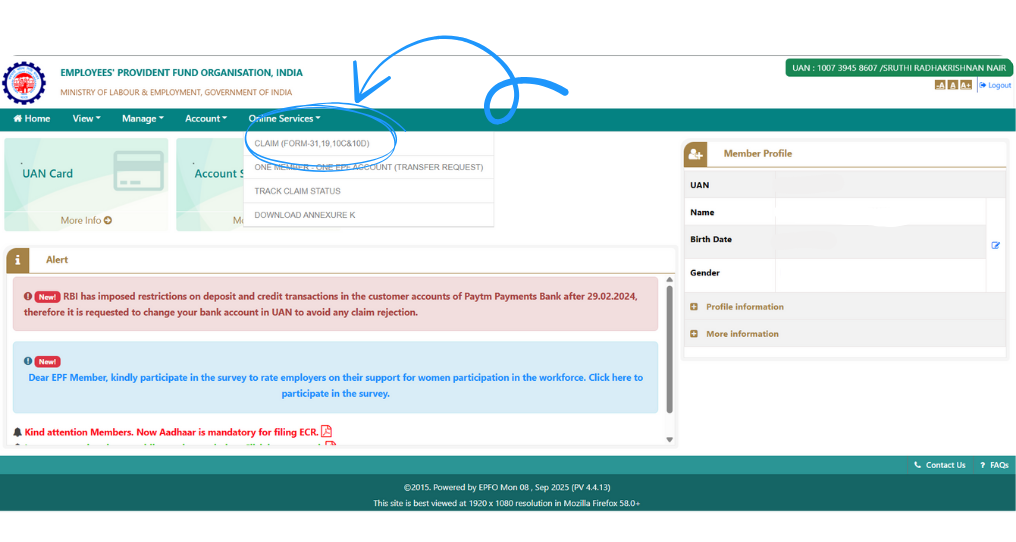
Step 3: Select “Claim (Form- 19)”
Under Online Services, click “Claim (Form-31, 19, 10C & 10D)”.
This opens the page where you can choose between different types of claims, including PF Advance, Pension Withdrawal, and PF Final Settlement (Form-19).
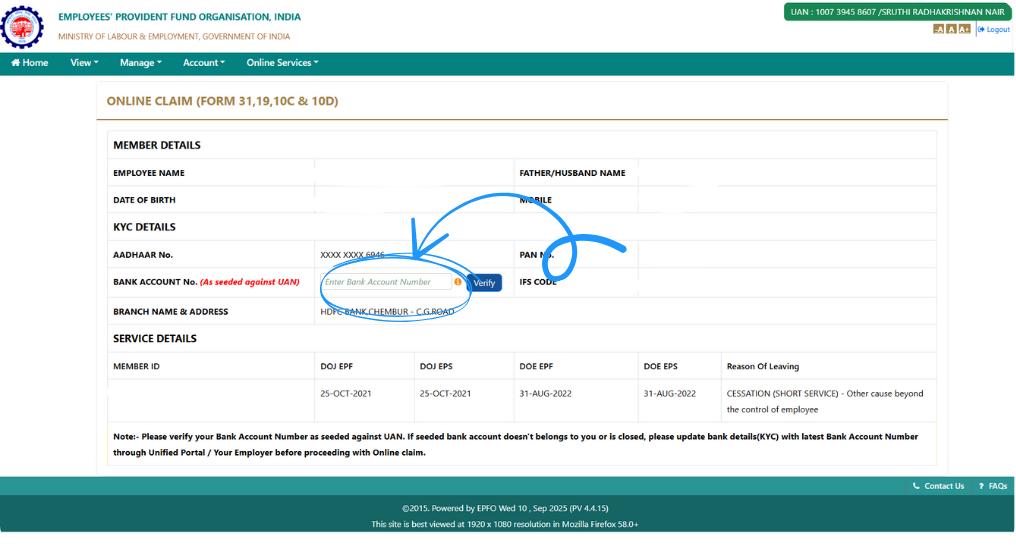
Step 4: Enter and Verify Your Bank Details
Provide the bank account number linked to your PF account and click Verify.
This ensures your PF settlement amount will be transferred to the correct account. Double-check that your account number, IFSC code, and name match your EPFO records to avoid delays.
Step 5: Click “Proceed for Online Claim”
Once your bank details are verified, click “Proceed for Online Claim.”
This will take you to the claim form where you can select your withdrawal type.
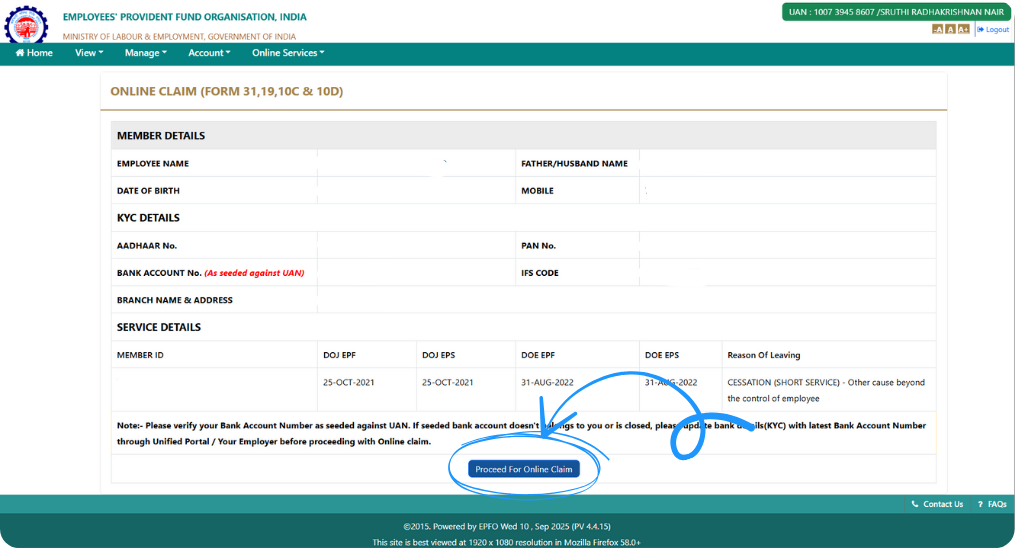
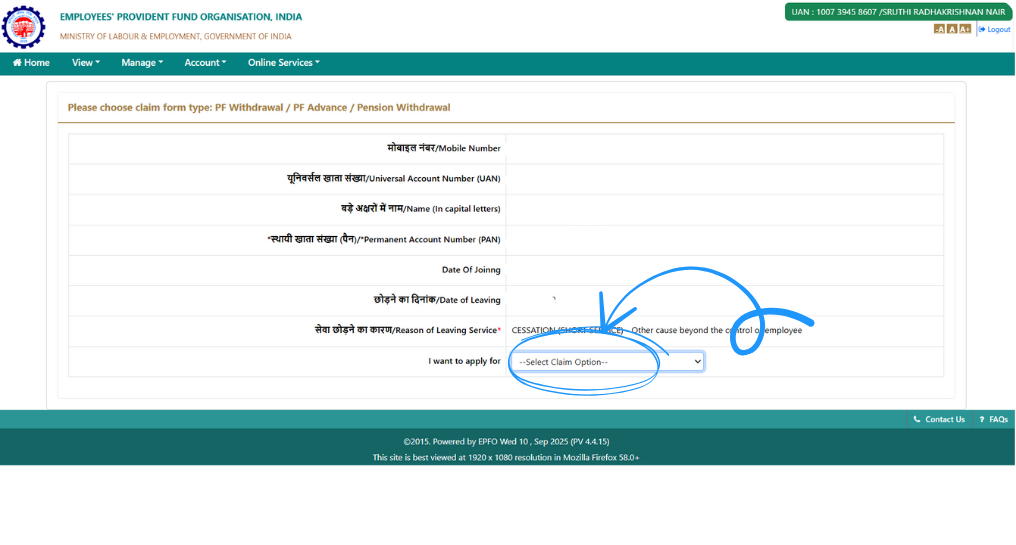
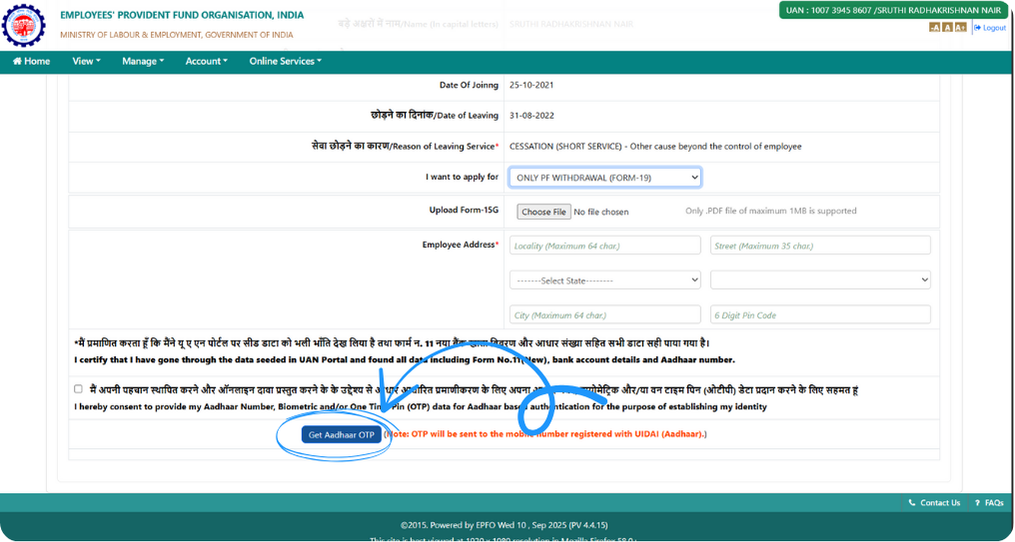
Step 6: Choose Your Claim Option
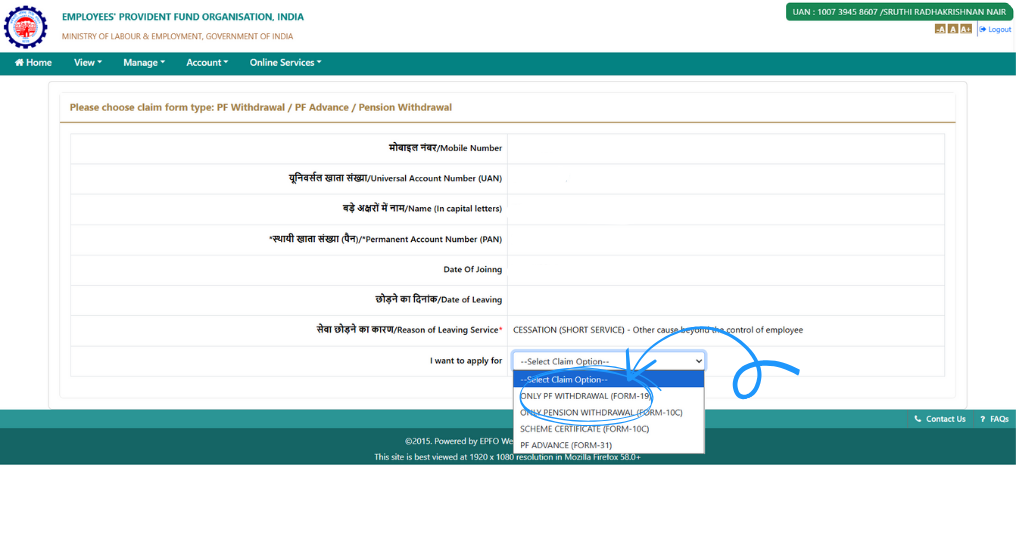
From the dropdown menu, select “Only PF Withdrawal (Form-19)”.
This option ensures that your request is specifically for full PF settlement and not for partial withdrawal or pension benefits.
Step 7: Confirm the PF Final Withdrawal Option (Form-19)
On the next screen, check that the claim type shown is “Only PF Withdrawal (Form-19)”.
This confirms you are applying for final settlement of your Provident Fund account.
Step 8: Enter Your Aadhaar Address and Upload the Self-Declaration
Enter the address exactly as mentioned on your Aadhaar card to ensure a smooth verification process. Next, upload your self-declaration for no TDS (if applicable). It helps avoid TDS deduction for eligible individuals, that is, if the tax on your estimated total income for the year is nil.
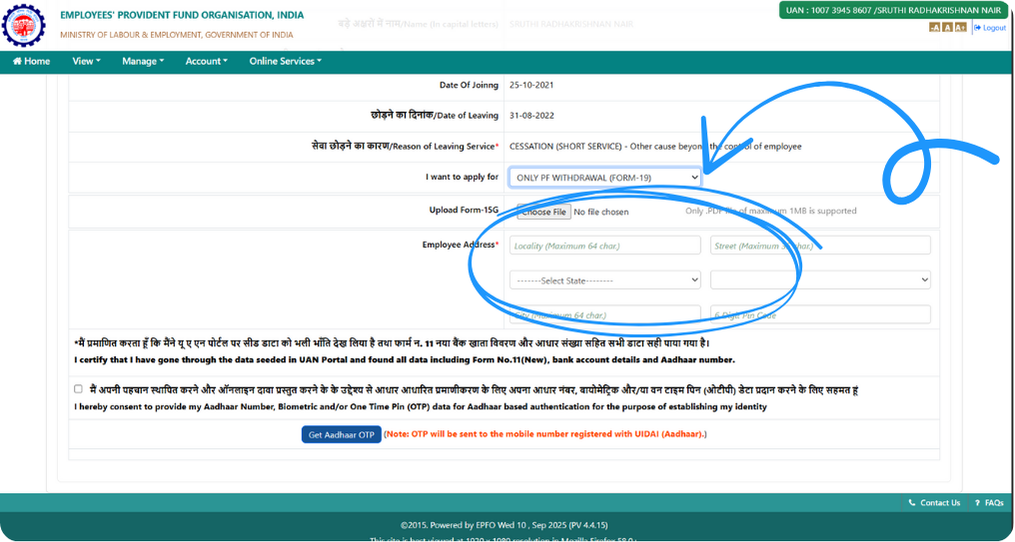
Step 9: Verify with Aadhaar OTP and Submit
Click on “Get Aadhaar OTP.” You’ll receive a one-time password on your Aadhaar-linked mobile number.
Enter the OTP and click Submit to complete the claim process.
Congratulations! 🎉 You’ve successfully submitted your PF Final Settlement (Form-19) online. EPFO has to settle a complete claim within 20 days. You can track your claim under “Track Claim Status” on the EPFO portal. For any delay or rejection, raise a ticket on the EPFO Grievance Portal.
By following these steps carefully, you can complete your PF withdrawal securely and get your hard-earned savings directly into your bank account — quickly and without hassle.
Rules as of October 2026, from the Employees' Provident Funds Scheme, 2026 (paragraphs 13, 49 and 54), the Employees' Pension Scheme, 2026 (paragraph 13) and the Income-tax Act, 2025 (sections 392(7) and 393(6), Schedule XI). This is general information, not tax advice.
Frequently asked questions
How many days does EPFO take to settle a PF final settlement claim?
Under the EPF Scheme, 2026, EPFO must settle a complete claim and pay the money within 20 days of receiving it. If anything is missing, it has to tell you within those 20 days. A delay beyond 20 days without good reason may attract penal interest of 12% a year.
Can I withdraw my full PF immediately after resigning?
No. If you have resigned, you can withdraw the full balance only after you have not worked in any EPF-covered establishment for 12 continuous months before you apply. Women who resign to get married do not have to wait. Retirement after 55, moving abroad, retrenchment and voluntary retirement allow an immediate claim.
Is PF final settlement taxable?
It is tax-free if you have 5 or more years of continuous service, counting earlier employers whose PF was transferred, or if your job ended due to ill-health, business closure or another reason beyond your control. Otherwise it is taxable, and EPFO deducts 10% TDS when the payout is Rs 50,000 or more.
Does Form-19 include my pension (EPS) amount?
No. Form-19 settles only your PF balance. If you have less than 10 years of pension service, you claim the pension amount separately with Form-10C, 36 months after your last contribution became due or on reaching superannuation age if that is earlier.
Should I withdraw my PF or transfer it when I change jobs?
Transfer it. If you withdraw the full balance and later join another EPF-covered employer, you start again as a fresh member and lose the continuous service that keeps the withdrawal tax-free. Use the One Member - One EPF Account transfer on the EPFO portal instead.
2,00,000+ Stories
Hope they inspires you as well.

their NPS stories for a golden retirement.







PensionBox simplifies the National Pension System(NPS), the government's pension scheme for private employees both for retail users and HRs/companies.
If you don’t have an NPS account, you can simply open your pension account within 2 minutes and if you have NPS PRAN already, you will be able track, invest and manage everything free of charge with best user experience.
We never touch or hold your money directly, your investments go safely to your chosen pension fund through approved channels.
We are built with Zerodha as POP , ensuring transparency, data security, and peace of mind. Your retirement savings are protected by regulation and secured by technology.
That’s why, PensionBox brings transparency, zero charges, timely support and freedom to select any pension fund so that you get the best experience investing in NPS & be better future ready.
That’s not it, we help you & your company together to maximise contribution and tax savings with minimal charges & best user experience.
If you are an existing zerodha user then you get a fast login or sign up using kite ID.
Once you are onboarded with kite ID, you get free access to
- Open NPS in 2 minutes
- Track existing NPS
- POP shift or CRA shifting
- Invest in one time or create SIP in NPS
- Withdraw NPS requests & instant withdraw tier 2
- Create your dream retirement plan
- Open NPS Vatsalya for your kid
- Share with HR (To unlock more tax benefits)
- Employer Contribution:
- Contributions made by your employer to your NPS account are tax-free up to 14% of your basic salary under Section 80CCD(2). Do connect us with your HR to enable this for you.
Tax Benefits in Old Tax Regime - Self-Contribution:
- Deduction up to ₹1.5 lakh under Section 80C.
- Additional deduction of ₹50,000 under Section 80CCD(1B) — exclusive to NPS investments!
- This allows you to claim a total deduction of up to ₹2 lakh every year on your NPS contributions.
- Employer Contribution:
- Contributions made by your employer to your NPS account are tax-free up to 10% of your basic salary (Basic + DA) under Section 80CCD(2). Do connect us with your HR to enable this for you.
- This is over and above your personal deduction limits, giving you extra tax efficiency.
Feel free to book a free call to learn more about NPS, NPS Vatsalya, Corporate NPS & PensionBox or contact the support team.