
How to Set Up Your Corporate NPS Contribution

If you’ve opted for the National Pension System (NPS), setting your contribution percentage is quick and straightforward. Follow this simple step-by-step guide to update or modify your monthly NPS contribution through the PensionBox portal. It also explains how to choose the right tax regime and contribution percentage based on your salary structure.
Step 1: Login
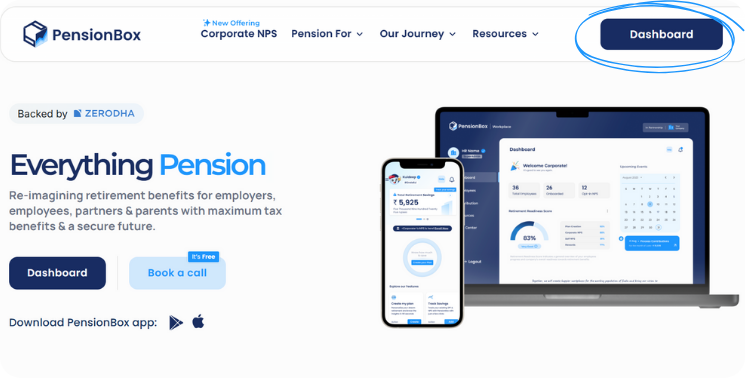
Go to the PensionBox website (http://www.pensionbox.in) or open the app. Click on Dashboard
Step 2: Open Profile
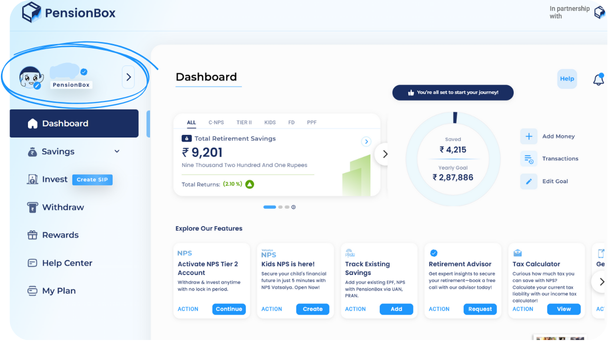
After login, click the Profile section from the dashboard menu. The Contribution settings live inside your profile.
Step 3: Find Total Contribution
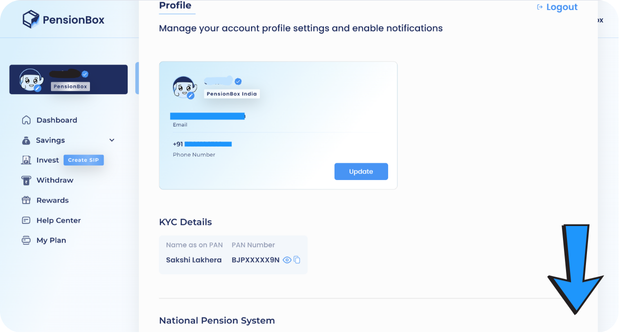
Scroll the Profile page until you find the Total Contribution area. This displays current contribution rates and a control to change them.
Step 4: Click the Change icon
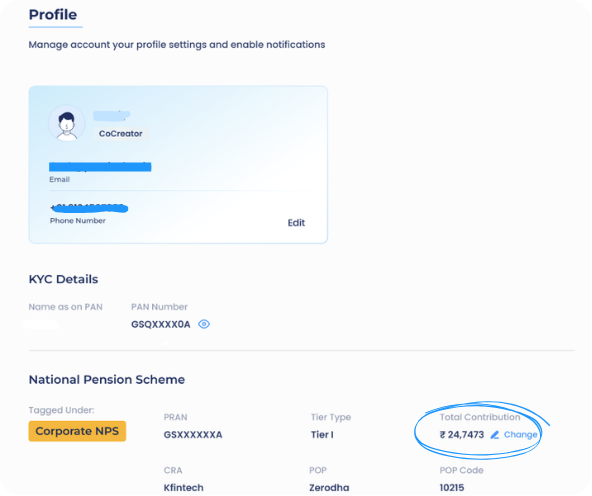
Click the Change next to Total Contribution to open the input fields where you set your monthly CNPS contribution.
Step 5: Set contribution & tax regime
Choose the tax regime and then enter the monthly contribution you want:
- New Tax Regime: Maximum deduction allowed is 14% of basic salary.
- Old Tax Regime: Maximum deduction allowed is 10% of basic salary.
The contribution amount doesn’t exceed the allowed percentage for your chosen regime
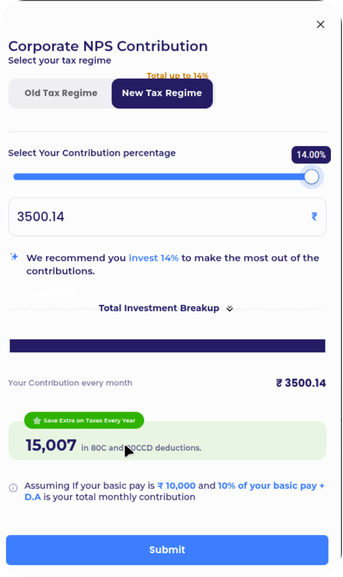
Congratulations! You’ve successfully set your NPS contribution percentage. The system will now automatically calculate and deduct your chosen amount from your basic salary based on the tax regime you selected. If, in the future, you wish to make any changes such as increasing your contribution for higher savings or adjusting it to match your financial goals, you can easily do so from the same Total Contribution section in your profile.
Corporate NPS = extra tax savings for your employees, zero cost to your company. Under Section 80CCD(2) it’s deductible over and above the ₹1.5L 80C limit. PensionBox sets it up end-to-end. Offer Corporate NPS to your team →
2,00,000+ Stories
Hope they inspires you as well.

their NPS stories for a golden retirement.







PensionBox simplifies the National Pension System(NPS), the government's pension scheme for private employees both for retail users and HRs/companies.
If you don’t have an NPS account, you can simply open your pension account within 2 minutes and if you have NPS PRAN already, you will be able track, invest and manage everything free of charge with best user experience.
We never touch or hold your money directly, your investments go safely to your chosen pension fund through approved channels.
We are built with Zerodha as POP , ensuring transparency, data security, and peace of mind. Your retirement savings are protected by regulation and secured by technology.
That’s why, PensionBox brings transparency, zero charges, timely support and freedom to select any pension fund so that you get the best experience investing in NPS & be better future ready.
That’s not it, we help you & your company together to maximise contribution and tax savings with minimal charges & best user experience.
If you are an existing zerodha user then you get a fast login or sign up using kite ID.
Once you are onboarded with kite ID, you get free access to
- Open NPS in 2 minutes
- Track existing NPS
- POP shift or CRA shifting
- Invest in one time or create SIP in NPS
- Withdraw NPS requests & instant withdraw tier 2
- Create your dream retirement plan
- Open NPS Vatsalya for your kid
- Share with HR (To unlock more tax benefits)
- Employer Contribution:
- Contributions made by your employer to your NPS account are tax-free up to 14% of your basic salary under Section 80CCD(2). Do connect us with your HR to enable this for you.
Tax Benefits in Old Tax Regime - Self-Contribution:
- Deduction up to ₹1.5 lakh under Section 80C.
- Additional deduction of ₹50,000 under Section 80CCD(1B) — exclusive to NPS investments!
- This allows you to claim a total deduction of up to ₹2 lakh every year on your NPS contributions.
- Employer Contribution:
- Contributions made by your employer to your NPS account are tax-free up to 10% of your basic salary (Basic + DA) under Section 80CCD(2). Do connect us with your HR to enable this for you.
- This is over and above your personal deduction limits, giving you extra tax efficiency.
Feel free to book a free call to learn more about NPS, NPS Vatsalya, Corporate NPS & PensionBox or contact the support team.